
Understanding the 3 pension status categories on the MoneyHelper Pensions Dashboard
As development of the MoneyHelper Pensions Dashboard continues, one of the most important features being refined through research and testing is how pensions information is categorised and displayed, depending on the results of the data matching process and what view data is available.
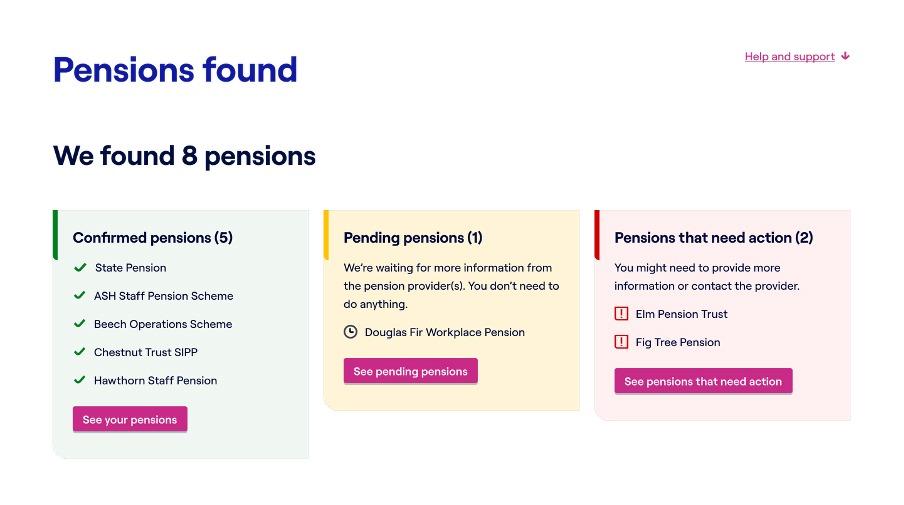
Below we set out what industry can expect regarding the different pension status categories that will appear on the dashboard; confirmed pensions, pending pensions and pensions that need action, and how these categories will help users make sense of their pensions.
Confirmed pensions
Confirmed pensions are those where a successful match has been made. This means the pension provider or scheme is confident, based on their matching criteria and the information received from the Find your pensions service, that the pension belongs to this individual making the request for information. In these cases, the pension provider or scheme is able to supply all the required data immediately. These pensions appear as complete and ready for the user to view.
When a user opens an individual confirmed pension, they will first see key details about that specific pension. This usually includes the estimated retirement income it could provide, when payments are expected to begin and other information shared by the pension provider or scheme.
Users can also view a consolidated summary of their total estimated retirement income, showing the year they will reach State Pension age and how much they could receive from all confirmed pensions in that year, displayed both monthly and annually. A timeline view is also available, helping users understand how their total pension income may change over time.
Pending pensions
A pension will appear as pending when it has been successfully matched to the user as per the above, but not all the required pension information can be displayed yet. This happens when a pension provider or scheme needs more time to provide the user’s pensions data.
The user does not need to do anything in this scenario. Once the pension provider or scheme supplies all required data, the pension automatically moves into the confirmed category.
In most cases, users are encouraged to check back again in a few days, as pension providers and schemes must return the required information within set time limits. For value data this is typically within 3 working days for schemes where all benefits are defined contribution, or 10 working days for all other cases. There are a small number of legislative exemptions, such as schemes winding up or moving to the Pension Protection Fund (PPF) or where a user has recently joined the scheme, where more time is allowed for.
For more background on data return timeframes, we have provided information in our data preparation blog.
Pensions that need action
Pensions may appear in the final category, pensions that need action, in two scenarios. Firstly, when a possible match has been made and additional information is needed to verify it. Secondly, when the pension provider or scheme has returned a code to indicate there has been a match, but the user should contact the provider or scheme before it provides any (or all) of the user’s pensions information. This is the only category where user intervention may be required before the pension can progress into “pending” or “confirmed.”
Where a possible match has been returned, users can try entering their National Insurance number if they haven’t already. If this doesn’t resolve the issue, they will need to contact their pension provider or scheme.
For this category, the user will be provided with the information they need to contact the relevant pension provider or scheme to help resolve the issue. A scam warning is also featured, reminding the user that for security reasons, they must be the ones to contact their provider or scheme rather than the other way round.
This category has some implications for pension providers and schemes as they must resolve these issues within a reasonable timeframe. It may lead to increased initial contact volumes, so support channels including phone and digital services should be prepared for dashboard-driven enquiries.
Looking ahead
As testing continues, we anticipate that these pension categories will remain a core part of the user experience on the MoneyHelper Pensions Dashboard. We are continuing to test and refine how these categories are presented to ensure they are as clear and intuitive as possible, and that users understand what each category means and what, if anything, they need to do.
This ongoing improvement work is designed to help users feel confident navigating their pensions information, reduce confusion, and support people in planning for their retirement ahead of public access to dashboards.
For industry, understanding how these categories appear and what they mean will be helpful in supporting their preparations for the dashboard rollout. By ensuring data accuracy, efficient support channels and readiness for increased engagement, pension providers and schemes can help ensure a smooth, positive experience for users when the dashboard becomes publicly available.

- Author:
- Pensions Dashboards Programme
Published: 05 March 2026