
Reporting standards: draft version 2.3
Contents
The reporting standards set out requirements on pension providers and schemes for generating and recording operational information and reporting it to the Money and Pensions Service (MaPS), to support oversight and management of the dashboards ecosystem and regulators' functions in respect of compliance monitoring and enforcement.
Version 2.3
These draft updated reporting standards have been developed to support implementation of daily reporting of data to MaPS. Currently, the reporting standards version 2.0, which were approved by the Secretary of State for Work and Pensions and the Department for Communities (Northern Ireland) in March 2025, require only the generation and retention of records, to be made available to MaPS on request.
However, the publication made clear that at a later date MaPS would implement routine reporting of data via APIs against the requirements in the reporting standards. This updated draft version therefore sets out the technical requirements for the routine submission of this data to MaPS. It does not change what data is to be generated, recorded and reported; only how the data is to be reported to MaPS.
MaPS consulted on the proposed implementation of the draft updated reporting standards and have published the consultation outcome which confirms the intended implementation deadline of 1 March 2027, subject to approval by the Secretary of State for Work and Pensions and the Department for Communities (Northern Ireland).
Read guidance on reporting coverage data for RS1.1 on request from MaPS and the guidance on interim manual reporting from September 2026.
The reporting standards version 2.0 were approved by the Secretary of State for Work and Pensions and the Department for Communities (Northern Ireland) in March 2025, making them legally binding. This version will continue to be legally binding for connected pension providers and schemes until a new version is formally approved.
Changelog updates
Refer to the changelog for updates since the last publication.
Back to topDownloads
Download the APIs and schemas related to the reporting standards. The standards document and related downloads are versioned independently, so their version numbers may not always align.
Download reporting-api-v2.2.zip
This zip folder contains:
PensionsDashboard-reporting-api-2_2.yaml
Introduction
1. Pensions dashboards are apps, websites or other tools which help individuals view information about their multiple pensions in one secure place online, at a time of their choosing. They bring together information on all a user’s (in-scope) pensions, including their State Pension as well as any occupational and personal pensions. This supports individuals’ engagement with their pensions and their planning for retirement.
2. The Money and Pensions Service (MaPS) set up the Pensions Dashboards Programme (PDP) in 2019 to design and build the central digital architecture (CDA) and services that make pensions dashboards possible. PDP is also responsible for the supporting governance framework, service design and operating model for the pensions dashboards ecosystem.
3. The pensions dashboards ecosystem enables millions of individuals to connect with their pensions information through multiple pensions dashboards across thousands of pension providers and schemes. Find out more about the pensions dashboards ecosystem and its components.
4. MaPS is also responsible for operating its own non-commercial pensions dashboard as a public service.
Purpose
5. These reporting standards are issued by MaPS under delegated powers given by the Pensions Dashboards Regulations 2022 and the Pensions Dashboards Regulations (Northern Ireland) 2023 (referred to hereafter as ‘Regulations’) and the Rules of the Financial Conduct Authority (FCA) (hereafter ‘Rules’).
6. The reporting standards set out requirements on pension providers and schemes for generating and recording operational information and (later) reporting it to MaPS on a regular basis. The information will support the oversight and management of the dashboards ecosystem and compliance monitoring and enforcement.
Application
7. These standards apply legally to the trustees or scheme managers of occupational pension schemes (pension schemes) and the managers of stakeholder and personal pension schemes (pension providers) connected to, or required to connect to, the pensions dashboards ecosystem. This version does not include any standards that apply to dashboard providers. The standards for dashboard providers will be published separately.
8. Information provided in accordance with these standards must be provided at the level of an occupational pension scheme (identified by a Pension Scheme Registry (PSR) number) or personal pension provider (identified by a Firm Reference Number (FRN)). Regardless of which party is sending the data, a single connected party may send reporting data for multiple providers or schemes that are connected by means of that connecting party. Each report must include the relevant holdernameGuid (the unique identifier provided by the pension provider or scheme during connection, see technical standards) for the pension provider or scheme (or part thereof) to which the data relates, identifying a regulated entity and the endpoint serving data for it.
Note: An endpoint is the specific location within an API that accepts requests and sends back responses allowing the system components to communicate with each other.
9. The pension provider or scheme is responsible for compliance with the standards, even if implementation is delegated to a third party. It is therefore important for pension providers and schemes to understand the standards whether they are connecting directly to the ecosystem, or connecting using a third-party supplier such as a third-party administrator or software provider, including integrated service providers (ISPs). In the latter case, the third parties will apply the standards by sending the data to MaPS on behalf of their client pension providers and schemes. A pension provider or scheme connecting via an already connected third party will use the third party’s processes to meet these standards. When referring to pension providers and schemes, this includes any of these third parties.
10. Where a provider or scheme has split administration (for example, a main scheme and a separate AVC provider), and is connecting to the dashboards ecosystem via multiple connections to the ecosystem, reporting for that pension provider/scheme in accordance with these reporting standards must be via each connecting party that is connected and supplying data on behalf of the scheme. Each connecting party must provide data against all of the requirements in the reporting standards for the part of the scheme’s connection (represented by a holdernameGuid) that connecting party represents.
Jurisdiction
11. These standards apply to all United Kingdom pension providers subject to the dashboard duties in the Rules for pension providers, and all United Kingdom schemes subject to the dashboard duties in the Regulations.
Other standards
12. These standards should be read in conjunction with the other standards for pension providers and schemes (technical standards, data standards and code of connection).
Compliance
13. Standards are mandatory requirements and, therefore, compliance by pension providers and schemes is compulsory.
Version
14. This is draft version 2.3 of the reporting standards. Refer to the changelog for updates since the last publication.
Summary
15. These standards cover requirements in relation to generating and reporting data about:
- Coverage: Of relevant member records.
- Service availability: For find and view.
- View responses: Including offline calculations performed and returns of value data unavailable codes.
16. From April 2025, when pension providers and schemes started connecting in line with the ‘connect by' dates in guidance, the reporting standards require only the generation and keeping of records, to be made available to MaPS or regulators upon request, not the routine reporting of this data to MaPS.
17. The reporting standards are being updated to implement reporting of data to MaPS via an API on a daily basis.
OpenAPI specifications
18. This version of the reporting standards should be read in conjunction with the OpenAPI specifications contained in the downloads.
Back to topData for ad hoc reporting on request (until 1 November 2026)
19. Pension providers and schemes must collect and submit the following reporting data to MaPS when MaPS requests it:
- Coverage
- RS.1.1 Relevant memberships connected
See the guidance on reporting coverage data for RS1.1.
Back to topCoverage
RS1.1 Relevant memberships connected
20. Requirement: Must record and report on request to MaPS, for each active holdernameGuid where the pension provider or scheme, once connected, has less than 100% of relevant member records connected:
a) The total number of connections used by the pension provider or scheme to connect to the dashboards ecosystem (that is, the number of directly connecting organisations supplying data to the ecosystem and reporting on behalf of the pension provider/scheme). In the case of a third-party connection provider connecting and reporting on behalf of a pension provider/scheme, this will require the third party to obtain information from the pension provider/scheme on the number of other third-party connection providers and any direct connection used by the pension provider or scheme.
b) The number of relevant member records that are connected for find and view (‘member_count_pass’) in respect of the active holdernameGuid for which the directly connecting organisation is submitting data, where ‘connected’ means all records for these members are available.
c) The number of relevant member records that are not connected (‘member_count_fail’) in respect of the active holdernameGuid.
21. Wherever total pension provider or scheme membership coverage is less than 100% prior to 1 November 2026, points (a) to (c) must be recorded and reported on request via all third-party connection providers connecting and reporting on its behalf, in respect of the relevant holdernameGuids, up until the pension provider or scheme’s total connection across all third-party connections is 100% of relevant member records, at which point this requirement ceases to apply, or until 1 November 2026, whichever is first.
22. If a connection is via a third-party supplier rather than direct, the pension provider or scheme may need to provide data on relevant memberships to its supplier, so that the supplier can report on its behalf.
23. Where a pension provider or scheme acquires a new book of business before 1 November 2026 which reduces connected records to less than 100%, the requirement to record and report on request memberships connected and not connected applies until 100% is reached, until 1 November 2026.
24. Frequency: Reported on request. MaPS will request this data occasionally in written instructions specifying the as-at date for coverage to be reported for, and the deadline for submission.
25. Rationale for the reporting requirement: Membership coverage is essential to MaPS’ and regulators’ advice to the Secretary of State for Work and Pensions on service readiness for public launch. Data is required on coverage of memberships to support regulators’ monitoring of compliance. The legislation requires all membership records to be connected, though it is anticipated that, initially, some pension providers and schemes will connect with less than 100% coverage. From 1 November 2026, there is no requirement to report this to MaPS, but the breach of law should be reported to the appropriate regulator. See FCA’s modification by consent and TPR breach of law reporting requirements.
Back to topData to be reported daily to MaPS via API once implemented
26. All of the following reporting data must be submitted by pension providers and schemes to MaPS by reporting APIs on a daily basis, for the previous day’s data. See Annex 1 for full details of the data fields that must be populated in the record submissions:
- Service unavailability
- RS2.1 Find service unavailability
- RS2.2 View service unavailability
- View responses
- RS3.1 View request numbers and response times
- RS3.2 Value data calculation times
- RS3.3 Values unavailable
Service unavailability
RS2.1 Find service unavailability
27. Requirement: Must report, for each active holdernameGuid:
a. Start and end date and time of each instance of scheduled find service unavailability.
b. Start and end date and time of each instance of unscheduled find service unavailability.
c. Reason for each instance of unavailability.
28. ‘Find service unavailability’ refers to any period during which the pension provider or scheme is unable to properly receive, acknowledge, and process find requests and comply with all associated requirements in accordance with its legislative duties, including undertaking matching against data received, obtaining tokens, and registering pension identifiers (PeIs). This includes both planned and unplanned downtime.
29. Find service unavailability does not include unavailability arising from issues with the central digital architecture or pensions dashboards, or issues affecting the availability of digital services generally (excluding cases where external issues impact the ecosystem such as global or local internet outages and internet infrastructure issues). Neither does it include periods during which systems are functionally operational but under-performing in terms of response times.
30. At a minimum, find service unavailability should be recorded and reported in any of the following scenarios:
- a find endpoint is offline
- a find endpoint returns any HTTP 5XX errors (for example, internal server error, API gateway down, service unavailable) and is unable to acknowledge receipt of find requests
- a find endpoint returns a HTTP 429 (‘too many requests’) error code on the maximum retried request
- any downstream system required to support the find endpoint is not operational
- any downstream system to which the find request is passed is not operational
- system interfaces to the token API and rreguri APIs are not operational, preventing obtaining of tokens and registration of pension identifiers
- an internal pension-provider-side system error prevents the exchange of tokens necessary for registration of a pension identifier (PeI) within the token validity period, preventing PeI registration
31. Record and report find service unavailability by aggregating the unavailability of:
- the provider or scheme
- the find endpoint (if different )
- any relevant intermediaries (if there are any)
32. Where there has been no service unavailability for the reporting period, ‘null submission’ must be submitted to confirm the absence of relevant unavailability data to report.
33. Where an instance of service unavailability spans more than one reporting period, it must be reported per reporting period and so be reported as 2 separate events, with the relevant portion of the downtime reported in each reporting period. For example, portion 1 is reported up to midnight of the first reporting period, and portion 2 from midnight of the second reporting period. The start and end times must be reported in UTC .
34. Rationale for the reporting requirement: In accordance with legislation, pension providers and schemes are expected to remain connected at all times. The code of connection requires targeting 99.5% service availability per calendar month (CoCo2.1.5), targeting service restoration within 2 hours in the case of endpoint outage (CoCo2.1.4), and providing 5 days’ notice for scheduled service unavailability (CoCo2.2.1).
35. API to use to submit the reporting data: Pension provider or scheme availability API.
RS2.2 View service unavailability
36. Requirement: Must report for each active holdernameGuid:
a. Start and end date and time of each instance of scheduled view service unavailability.
b. Start and end date and time of each instance of unscheduled view service unavailability.
c. Reason for each instance of unavailability.
37. ‘View service unavailability’ refers to any period during which the pension provider or scheme is unable to properly receive and process view requests in accordance with its legislative duties, including authorisation calls to the CDA introspect API and the perm API, and returning view data to the requesting dashboard.
38. View service unavailability does not include unavailability arising from issues with the central digital architecture or pensions dashboards, or issues affecting the availability of digital services generally (excluding cases where external issues impact the ecosystem such as global or local internet outages, internet infrastructure issues). Neither does it include periods during which systems are functionally operational but under-performing in terms of response times.
39. At a minimum, view service unavailability should be recorded and reported in any of the following scenarios:
- a view endpoint that receives view requests is offline
- a view endpoint returns any HTTP 5XX errors (e.g. internal server error, API gateway down, service unavailable) and is unable to acknowledge receipt of view requests
- a view endpoint returns a HTTP 429 (‘too many requests’) error code on the maximum retried request
- any downstream system required to support the view endpoint is not operational
- any downstream system to which the view request is passed is not operational
- any system involved in supplying the view data to the requesting dashboard is not operational, preventing the return of view data to the requesting dashboard
- system interfaces to the introspect API and perm APIs are not operational, preventing obtaining of tokens and authorisation of view requests
- system interfaces to the dashboard requesting the view data are not operational, preventing the return of view data
40. Record and report view service unavailability by aggregating the unavailability of:
- the provider or scheme
- the view endpoint (if different)
- any relevant intermediaries (if there are any)
41. Where there has been no service unavailability for the reporting period, ‘null submission’ must be submitted to confirm the absence of relevant unavailability data to report.
42. Where an instance of service unavailability spans more than one reporting period, it must be reported per reporting period and so be reported as 2 separate events, with the relevant portion of the downtime reported in each reporting period. For example, portion 1 is reported up to midnight of the first reporting period, and portion 2 from midnight of the second reporting period. The start and end times must be reported in UTC .
43. Rationale for the reporting requirement: In accordance with legislation, pension providers and schemes are expected to remain connected at all times. The code of connection requires targeting 99.5% service availability per calendar month (CoCo2.1.5).
44. API to use to submit the reporting data: Pension provider/scheme availability API.
Back to topView responses
RS3.1 View request numbers and response times
45. Requirement: Must report for each active holdernameGuid:
a) Number of view requests received.
b) For each view response that exceeds 10 seconds, the date and time of both the view request and the view response returned.
Note: Only returns of view data tokens in response to authorised view requests (where the tokens are all valid, rather than where new access tokens must be requested) should be counted and reported for RS3.1(b). This should exclude any cases where the view request contains invalid or missing tokens that have to be requested. Likewise, this should exclude any view responses exceeding the 10-second response time where this is due solely to CDA errors returned in response to the CDA introspect API calls to check authorisation of view requests. CDA-side processing is not part of view response time calculation.
46. Where there have been no view responses exceeding 10 seconds within the reporting period, ‘null submission’ must be submitted to confirm the absence of relevant response time data to report for RS3.1(b).
47. Actual times must be reported in UTC.
48. Rationale for the reporting requirement: The code of connection requires 99.9% of view responses to be sent within 10 seconds of receipt of the view request measured over a 24-hour period (CoCo2.1.3).
49. API to use to submit the reporting data: View response API.
RS3.2 Value data calculation times
50. Requirement: Must report, for each active holdernameGuid, calculation time taken for each value data calculation where the pension provider or scheme makes use of the 3/10 working day timeframe permitted by the legislation, as indicated by returning the unavailable codes ‘DCC’ or ‘DBC’ for data standards 2.301/401.
Note: Where a value has been generated for a statement provided within the last 13 months or a calculation for the member within the last 12 months, the legislation requires the data to be made available immediately. Where this does not apply, however, the legislation allows time to calculate the values – 3 working days where all the benefits provided to a member are money purchase (defined contribution), 10 working days in all other cases. The data standards ERI/accrued unavailable fields (2.301/401) provide the codes ‘DCC’ and ‘DBC’ accordingly, to indicate that values are being calculated and will be available within 3 or 10 working days.
When a pension provider or scheme returns a ‘DBC’ or ‘DCC’ unavailable code to indicate the values are being calculated and will be available within 3 or 10 working days, calculation times must then be reported, once the calculations have been performed and the value data made available for return to the dashboard. Each day, therefore, pension providers and schemes must report each calculation time, for all calculations completing during the reporting period (the previous day).
51. ‘Value data calculation time’ refers to the time taken to calculate the values to make the values available for return to the dashboard, and is to be recorded and reported as follows:
a) The relevant ‘value_code’ field, populated with either ‘DCC’ or ‘DBC’.
Note: Only calculation times for standard cases where ‘DCC’ or ‘DBC’ codes are returned need to be reported. Where other unavailable codes are used, there is no requirement to report calculation times (RS3.3 requires counts of certain codes used, however). This also applies where a ‘DBC’ or ‘DCC’ code is initially returned, but subsequently the pension provider or scheme identifies that another code is more appropriate and subsequently returns a code for which calculation time is not reportable. In this case, calculation time need not be reported. It would, however, be reported under RS3.3 where applicable.
These codes in the data standards do not determine the timeframe permitted by the legislation for the pension provider or scheme to return the value data. The value data required and the timeframe for returning it is determined by the legislation, and starts the day after the registration of the pension identifier as a match made (or updating of a possible match to a match made), not from the return of an unavailable code in response to a view request against that pension identifier. The legislation determines the 3 or 10 working day timeframe based on the nature of the benefits provided to the member under the scheme.
Unless a specific legislative exemption applies (such as the period allowed by the legislation before providing data for a new member, or the exemptions from providing projected values for DC benefits in the circumstances for which codes ‘DCHA’ or ‘DCHP’ are provided), pension providers and schemes have duties under the legislation to calculate the values within the prescribed timeframe, irrespective of unavailable codes being returned.
Therefore, although reporting of calculation times for cases other than ‘DCC’ or ‘DBC’ is not required, returning other codes does not remove pension providers and schemes’ legislative duties. Pension providers and schemes will need to ensure they keep records to be able to demonstrate they have the appropriate processes in place to provide the value data required by the legislation to members in a timely manner.
b) calculation start date – the point at which the clock starts for the 3 or 10 working days.
Note: There are 2 separate points when the clock could start for calculation time, as defined in the legislation and the code of connection. Pension providers and schemes will need to differentiate these to report calculation times:
- For the first calculations required following registration of the pension identifier (PeI), calculation time is measured from the day after the registration of the PeI as a match made, as per the legislation (see regulation 26(5)(b) and COBS 19.11.29).
- For subsequent calculations required later for the same pension (where there is no recent value data available to return immediately and values must be calculated, but it is long after the PeI registration and so (1) does not apply), calculation time is to be measured from the day after the receipt of the view request, as detailed in the code of connection (CoCo2.1.7). In this case, calculation time is unaffected by any subsequent requests. Calculation time then starts from the first view request where values are not available for immediate return.
Calculation time is unaffected by any subsequent view requests. Regardless of any subsequent view requests, the time taken from the relevant start date to calculate the values and make them available must be reported.
c) calculation end date – the point at which the calculation has been completed and the values are available for return to the dashboard.
Note: The calculation end date may be different to the last day of the 3/10 working day period allowed for the calculation, and may be different to the date the values are returned to the dashboard (the latter depends on the user making a view request).
Working days exclude weekends and bank holidays anywhere in the UK. This includes bank holidays that only apply to one of the UK nations. This is defined in the legislation: see Regulation 26(8)(b) and the FCA rules Annex A.
Value data could be made available before the calculation start date, since the start date is the day after the registration of the PeI (or day after the view request – see paragraph 51(b)(1) above). In this case, the calculation start and end date must still be recorded and reported, with the end date being before the start date.
52. Where there are multiple values to be calculated (when there are multiple benefit illustrations, for example, a recurring income and a lump sum, or distinct tranches of income) and the values will be calculated separately and may be available to the dashboard user at different points in time, each calculation must be reported separately. The data field ‘calculation_type’ must then be populated as ‘multiple’. In this case, calculation time (calculation start date, calculation end date, and value unavailable code) must be reported separately for each ERI value calculation and for each accrued value calculation.
53. Where all values for a member’s benefits under the scheme are calculated and made available together at the same time, however, they may be reported as a single calculation time in respect of provision of value data for that user (in this case, there is no distinction between ERI and accrued value calculation time, since all values are calculated as one operation). The data field ‘calculation_type’ must then be populated as ‘single’.
54. Where there have been no calculations that have completed within the reporting period, ‘null submission’ must be submitted to confirm the absence of relevant calculation time data to report.
55. Rationale for the reporting requirement: The legislation (Regulation 26(5)(b)(i) and (ii); COBS 19.11.29) requires that where view data is not available for immediate return and must be calculated, calculations must be available within 3/10 working days, from the day after the day the pension identifier is registered as a match made (or reregistered as a match made, having previously been registered as a possible match). CoCo2.1.7 specifies where a subsequent view request is received and a new calculation is required, calculations must be made in the same timeframe, starting from the day after the receipt of the view request, rather than the day after the registration of the pension identifier.
56. API to use to submit the reporting data: View Response calculations API. Data must be provided in the format YYYY-MM-DDTHH:MM:SS.000Z, with the time component always set to 00:00:00.000Z (midnight UTC).
RS3.3 Values unavailable
57. Requirement: Must report for each active holdernameGuid the total number of times each of the following data standards codes below have been returned in view responses. A single view response could contain multiple codes and every use of each code below in view responses within the reporting period must be reported:
a) Data standard 2.004 (contact pension provider or scheme) is populated ‘true’. This number is submitted as ‘contact_count’.
b) Data standard 2.005 (administrative details not available, new member case) is populated ‘true’. This number is submitted as ‘missingadmin_count’.
c) Data standard 2.006 (temporary system error) is populated 'true'. This number is submitted as ‘temperror_count’.
d) Data standard 2.301 (ERI unavailable)/2.401 (accrued unavailable) is returned as code ‘ANO’. This number is submitted as ‘eri_unavail_ano_count’ and ‘accrued_unavail_ano_count’.
e) Data standard 2.301 (ERI unavailable)/2.401 (accrued unavailable) is returned as code ‘PPF’. This number is submitted as ‘eri_unavail_ppf_count’ and ‘accrued_unavail_ppf_count’.
f) Data standard 2.301 (ERI unavailable)/2.401 (accrued unavailable) is returned as code ‘TRN’. This number is submitted as ‘eri_unavail_trn_count’ and ‘accrued_unavail_trn_count’.
58. Rationale for the reporting requirement: These codes are used in circumstances where values are not returned.
59. API to use to submit the reporting data: Value data unavailable API.
Back to topGeneral reporting standards for submission of records by API
The following general reporting standards apply to all reporting API record submissions of data for RS2.1, RS2.2, RS3.1, RS3.2 and RS3.3.
Encoding
60. Request bodies (records of reporting data submitted to the reporting APIs) must be UTF-8 encoded (RFC 3629 - UTF-8, a transformation format of ISO 10646).
Reporting window
61. All initial record submissions must be attempted between midnight and 06:00am the day after the events for which the data is being reported. On the days that the clocks change between BST and GMT, the same 6-hour window applies: the window then changes accordingly from midnight to 05:00am when changing to GMT and midnight to 07:00am on the change to BST.
Date and time format
62. All dates must be expressed in the format YYYY-MM-DD and all date-time stamps as YYYY-MM-DDTHH:MM:SS.000Z, in accordance with ISO 8601:2004 to represent dates and times in a machine-readable format.
Maximum record size
63. All record submissions must be under 1MB in size. The exact allowable size is determined by the schema-level item limits defined in the reporting standards API’s Open API specification. These schema limits are designed to prevent the maximum record size being breached. Records exceeding the maximum size will be rejected. Where the reporting data to be submitted exceeds this maximum record size, the data must be submitted as multiple records sent as a batch, with a submission_id linking them together (see paragraph 65).
record_id (individual records)
64. Each individual record submitted must be given a unique record_id to identify the data record being submitted. Individual records do not require a submission_id.
submission_id (batch submissions)
65. Where the data to be reported exceeds the maximum record size, it must be split into multiple records (each identified by a distinct record_id) as part of a batch submission. Each of these individual records must then include in addition to the record_id (which is specific to each), a submission_id within the message body which is common to all records in the batch submission. This common submission_id must be used to identify the records as all being linked as part of one batch submission. Submission_id must always be populated for all records. For single records not requiring a submission_id, it must be populated as ‘null’.
Resubmissions to correct any inaccuracies
66. If following a record or batch submission the pension provider or scheme identifies an error in the reporting data submitted, the pension provider or scheme must resubmit that record or batch of records to correct the erroneous data, using the submission_status ‘correction’. Where a resubmission is required, the resubmission must fully replace the previous records. The record_id for the initial and the resubmission must be the same. Where a batch submission correction is needed, the submission_id for the initial submission and the resubmission must likewise be the same.
- Where a single erroneous record needs to be replaced with multiple records: The first corrected record needs to have the same record_id as the original record, but any additional records needed as part of the correction need unique record_ids, and then a submission_id is needed to link them together.
- Where multiple erroneous records are to be replaced with a single record: submission_id should be populated in the single record resubmitted, with the same submission_id used in the original batch submission. The record_id in the correction single record should be the record_id of the first record within the initial erroneous batch submission.
If a resubmission is needed to correct a submission already resubmitted (the correction contains mistakes), the record_id and (where applicable) submission_id must be the same across the original record/records and all subsequent resubmissions.
Transaction monitoring
67. An X-Request-ID (transaction identifier) must be created in accordance with the technical standards (see ‘Transaction monitoring’, paragraph 78) and included in each reporting submission.
Submission reason
68. Each record submission must include a submission_reason. This is one of:
a) ‘initial submission’ – this should be used for a first submission
b) ‘resubmission’ – this is for a subsequent submission to correct and replace a previous record or batch submission of records that has been identified as erroneous
c) ‘null submission’ – this is where the pension provider or scheme has no relevant reportable data for a given reporting standard in a given reporting period due to the absence of reportable events. This is different from a count of zero, which must always still be reported. This allows the system to distinguish between a missed submission and a valid null report to indicate no reportable data.
For ‘null submission’ record submissions, the only required data fields are the general ones used for all reporting: X-Request-ID, holdernameGuid, record_id, submission_id (if relevant), submission_reason, submission_status, and reporting_period_start.
The reasons are mutually exclusive. A record submission reason can only be one of ‘null’, ‘initial’, or 'resubmission'. This means that:
Where multiple holdernameGuids are reported per record (RS2.1 and RS2.2 only), if some holdernameGuids had unavailability to report while others had no reportable unavailability: The holdernameGuids for which there was no unavailability should be returned together as one record (with reason ‘null’). The holdernameGuids for which there was unavailability to report should be submitted together as a separate record (with reason ‘initial’).
Where a record needs to be resubmitted to correct a previous erroneous record, but the correct record is a null submission record: Since it is not possible to have both ‘resubmission’ and ‘null submission’ reasons for the same record, submission reason should be set to ‘null submission’ (rather than ‘resubmission’), with the status set to ‘correction’.
The ‘null submission’ reason is available for RS2.1, RS2.2, RS3.1(b) and RS3.2 only. Standards RS3.1(a) and RS3.3 do not have ‘null submission’ options and require the submission of data, even if the value is 0.
Submission status
69. Each record submission must include a submission_status, indicating whether the submission is:
a) ‘on time’ (first attempted within the specified reporting window (see paragraph 61) and applies even if, as a result of receiving a retriable error from the CDA reporting API endpoint and following the specified backoff and retry process, this submission in fact turns out to be received outside of that window, provided the initial attempted submission is within the reporting window the submission reason should be marked as ‘on time’)
b) ‘late’ (first attempted outside of the specified window)
c) ‘correction’ (a resubmission to correct erroneous records previously submitted
Reporting period start
70. Each record must include a reporting period start date and time – the day for which the data is being reported. This must be set to midnight (00:00:000) of the day to which the reporting data relates (this will be the previous day, in the case of a standard on-time initial submission).
Submission failure and retry rules
71. For successful submissions, the CDA will respond to the request to submit records with a HTTP 202 response, containing the message “accepted” and the date-time stamp in the response body. In all other cases where the pension provider or scheme instead receives an error code response from the CDA reporting API when attempting to submit records, it must follow the following backoff and retry rules:
a) When the following error codes are received by the pension provider or scheme from the CDA reporting API, the submission must be retried:
- HTTP 429 (too many requests)
- HTTP 500 (internal server error)
- HTTP 503 (service unavailable)
For these retriable errors, the pension provider or scheme must retry using exponential backoff protocol as follows:
Exponential backoff and retry rules for retriable errors
- Maximum number of retries: 10
- Base interval: 5000 milliseconds (ms)
- Exponential factor: 2
Where on the maximum number of retries the error response is still received, the pension provider or scheme should not retry the submission again but must raise a support ticket with MaPS service desk.
b) The following error codes are non-retriable:
- HTTP 400 (bad request)
- HTTP 401 (unauthorised)
- HTTP 403 (forbidden)
- HTTP 404 (resource/URL not found)
- HTTP 405 (method not allowed)
- HTTP 413 (content too large)
- HTTP 415 (unsupported media type)
These errors should not be retried but should be investigated and if the issue cannot be resolved, the pension provider or scheme must raise a service support ticket with MaPS in line with the standard service desk support process to log the issue.
72. To help internal investigation, diagnosis and remediation, error responses returned by the CDA reporting API contain pseudo codes which are machine-readable (for example, ‘INVALID_RECORD_ID’). See Annex 2 for the list of pseudo codes that may be received.
Back to topAPI definition
73. The Reporting API is a RESTful JSON-based API which is hosted by the CDA. It contains endpoints for service availability (/service-availability) and view responses (/view-response):
service-availability
- /service-availability/find
- /service-availability/view
view-response
- /view-response/request-number
- /view-response/response-time
- /view-response/calculations
- /view-response/unavailable
Pension providers and schemes submit reporting data records to these API endpoints using a HTTP POST call.
The open API specification can be found in the downloads.
Back to topDefinitions of identifiers
X-Request-ID
74. An X-Request-ID is a transaction identifier created in accordance with the technical standards (see ‘Transaction monitoring’) and included in each reporting submission. This provides a globally unique identifier for the request to submit a record to allow tracing of request flows.
holdernameGuid
75. A holdernameGuid is a globally unique identifier provided by the pension provider or scheme during the connection process to represent a pension provider or scheme – or a part of a pension provider or scheme – connected to the dashboards ecosystem. All reporting data is submitted per holdernameGuid. For RS3.1, 3.2, and 3.3, each record must be per holdernameGuid. For RS2.1 and 2.2, the schema allows for including multiple holdernameGuids within a single record, where multiple holdernames are affected by the same service unavailability (provided the record stays within the prescribed limits as defined by the schema and under the 1MB maximum record size).
record_id
76. The record_id is a globally unique identifier for every record sent – that is, a reporting API payload submitted for a particular holdernameGuid (or a group of holdernameGuids, for RS2.1 and RS2.2 only) for a particular reporting period. This enables tracking and identification of reports. All data included in the same reporting API payload will share a common record_id.
submission_id
77. The submission_id is a unique identifier used to link together a group of records (each with a unique record_id) sent in a batch. submission_id is used when submitting reporting data for RS2.1, RS2.2, RS 3.1, RS3.2, and RS3.3.
Back to topAnnex 1: Data catalogue
General data fields across all record submissions
| Item name | Description | Sent as | Type | Format | Mandatory |
|---|---|---|---|---|---|
| X-Request-ID | Unique identifier for the request to submit the record. | Header | String | UUID/GUID | Always |
| holdernameGuid | Unique identifier for the pension provider or scheme (or part thereof). | Request body | String | UUID/GUID | Always |
| record_id | Unique identifier for each record of reporting data submitted for a particular holdernameGuid to a particular reporting API endpoint. | Request body | String | UUID/GUID | Always |
| submission_id | Identifier for a batch of records. | Request body | String | UUID/GUID | Always - required to be valid GUID where records are batched and otherwise to be returned as null |
| submission_reason | Reason for the record submitted (‘initial’, ‘resubmission’, ‘null’). | Request body | String | Enum | Always |
| submission_status | Status of the record submitted (‘on time’, ‘late’, ‘correction’). | Request body | String | Enum | Always |
| reporting_period_start | Start date-time stamp for the reporting period for which the record is being submitted. | Request body | Date-time | YYYY-MM-DD THH:MM:SS.000Z | Always |
Data fields specific to RS2.1 and RS2.2
| Item name | Description | Sent as | Type | Format | Mandatory |
|---|---|---|---|---|---|
| unavail_scheduled | Identifies whether the unavailability was scheduled (true) or unscheduled (false). | Request body | Boolean | True/False | Always for RS2.1 and RS2.2 |
| unavail_reason | Reason for the service unavailability. | Request body | String | Plain text | Always for RS2.1 and RS2.2 |
| start_date_ts | Start date-time stamp for the period of unavailability. | Request body | Date-time | YYYY-MM-DD THH:MM:SS.000Z | Always for RS2.1 and RS2.2 |
| end_date_ts | End date-time stamp for the period of unavailability. | Request body | Date-time | YYYY-MM-DD THH:MM:SS.000Z | Always for RS2.1 and RS2.2 |
Data fields specific to RS3.1
| Item name | Description | Sent as | Type | Format | Mandatory |
|---|---|---|---|---|---|
| req_count | Number of view requests received. | Request body | Integer | Number | Always for RS3.1(a) |
| req_date_ts | Date-time stamp for when the view request (for which a response exceeding the 10-second response time was returned) was received. | Request body | Date-time | YYYY-MM-DD THH:MM:SS.000Z | Always for RS3.1(b) |
| resp_date_ts | Date-time stamp for when the view response exceeding the 10-second response time was returned. | Request body | Date-time | YYYY-MM-DD THH:MM:SS.000Z | Always for RS3.1(b) |
Data fields specific to RS3.2
| Item name | Description | Sent as | Type | Format | Mandatory |
|---|---|---|---|---|---|
| calculation_type | Identifies whether the calculation for which calculation time is being reported is a single calculation or where there are multiple calculations. | Request body | Enum | List | Always for RS3.2 |
| value_code | Identifies whether the benefits for which the calculation was performed were all money purchase (‘DCC’) or not (‘DBC’). | Request body | Enum | List | Always for RS3.2 |
| calculation_start_date | Date-time stamp for the calculation time clock start (either the day after the PeI was registered as a match made, or the day after the view request for a view request a long time later). The time component always set to 00:00:00.000Z (midnight UTC). | Request body | Date-time | YYYY-MM-DD THH:MM:SS.000Z | Always for RS3.2 |
| calculation_end_date | Date-time stamp for the calculation end date, when values are available. The time component always set to 00:00:00.000Z (midnight UTC). | Request body | Date-time | YYYY-MM-DD THH:MM:SS.000Z | Always for RS3.2 |
Data fields specific to RS3.3
| Item name | Description | Sent as | Type | Format | Mandatory |
|---|---|---|---|---|---|
| contact_count | Total count of returns of data standard 2.004 (contact pension provider or scheme) populated ‘true’. | Request body | Integer | Number | Always for RS3.3 |
| missingadmin_count | Total count of returns of data standard 2.005 (administrative details not available, new member case) populated ‘true’. | Request body | Integer | Number | Always for RS3.3 |
| temperror_count | Total count of returns of data standard 2.006 (temporary system error) populated 'true'. | Request body | Integer | Number | Always for RS3.3 |
| eri_unavail_ano_count | Total count of returns of data standard 2.301 (ERI unavailable) as code ‘ANO’. | Request body | Integer | Number | Always for RS3.3 |
| eri_unavail_ppf_count | Total count of returns of data standard 2.301 (ERI unavailable) as code ‘PPF’. | Request body | Integer | Number | Always for RS3.3 |
| eri_unavail_trn_count | Total count of returns of data standard 2.301 (ERI unavailable) as code ‘TRN’. | Request body | Integer | Number | Always for RS3.3 |
| accrued_unavail_ano_count | Total count of returns of data standard 2.401 (accrued unavailable) as code ‘ANO’. | Request body | Integer | Number | Always for RS3.3 |
| accrued_unavail_ppf_count | Total count of returns of data standard 2.401 (accrued unavailable) as code ‘PPF’. | Request body | Integer | Number | Always for RS3.3 |
| accrued_unavail_trn_count | Total count of returns of data standard 2.401 (accrued unavailable) as code ‘TRN’. | Request body | Integer | Number | Always for RS3.3 |
Annex 2: Pseudo codes in CDA error responses
| Code | Description | HTTP error code | Used in |
|---|---|---|---|
| INVALID_X_REQUEST_ID | X-request-ID is missing or invalid in header. | 400 | All |
| INVALID_HOLDERNAMEGUID | holdernameGuid is missing or invalid in request body. | 400 | All |
| INVALID_RECORD_ID | record_id is missing or invalid in request body. | 400 | All |
| INVALID_SUBMISSION_ID | submission_id is missing or invalid in request body. | 400 | All |
| INVALID_SUBMISSION_REASON | submission_reason is missing or invalid in request body. | 400 | All |
| INVALID_SUBMISSION_STATUS | submission_status is missing or invalid in request body. | 400 | All |
| INVALID_REPORTING_PERIOD_START | reporting_period_start is missing or invalid in request body. | 400 | All |
| INVALID_UNAVAIL_SCHEDULED | unavail_scheduled is missing or invalid in request body. | 400 | RS2.1 RS2.2 |
| INVALID_UNAVAIL_REASON | unavail_reason is missing or invalid in request body. | 400 | RS2.1 RS2.2 |
| INVALID_START_DATE_TS | start_date is missing or invalid in request body. | 400 | RS2.1 RS2.2 |
| INVALID_END_DATE_TS | end_date_ts is missing or invalid in request body. | 400 | RS2.1 RS2.2 |
| INVALID_REQ_COUNT | req_count is missing or invalid in request body. | 400 | RS3.1 |
| INVALID_REQ_DATE_TS | req_date_ts is missing or invalid in request body. | 400 | RS3.1 |
| INVALID_RESP_DATE_TS | resp_date_ts is missing or invalid in request body. | 400 | RS3.1 |
| INVALID_VALUE_CODE | value_code is missing or invalid in request body. | 400 | RS3.2 |
| INVALID_CALCULATION_START_DATE | calculation_start_date is missing or invalid in request body. | 400 | RS3.2 |
| INVALID_CALCULATION_END_DATE | calculation_end_date is missing or invalid in request body. | 400 | RS3.2 |
| INVALID_CALCULATION_TYPE | calculation_type is missing or invalid in request body. | 400 | RS3.2 |
| INVALID_VALUE_CODE | value_code is missing or invalid in request body. | 400 | RS3.2 |
| INVALID_CONTACT_COUNT | contact_count is missing or invalid in request body. | 400 | RS3.3 |
| INVALID_MISSINGADMIN_COUNT | missingadmin_count is missing or invalid in request body. | 400 | RS3.3 |
| INVALID_TEMPERROR_COUNT | temperror_count is missing or invalid in request body. | 400 | RS3.3 |
| INVALID_ERI_UNAVAIL_ANO_COUNT | eri_unavail_ano_count is missing or invalid in request body. | 400 | RS3.3 |
| INVALID_ERI_UNAVAIL_PPF_COUNT | eri_unavail_ppf_count is missing or invalid in request body. | 400 | RS3.3 |
| INVALID_ERI_UNAVAIL_TRN_COUNT | eri_unavail_trn_count is missing or invalid in request body. | 400 | RS3.3 |
| INVALID_ACCRUED_UNAVAIL_ANO_COUNT | accrued_unavail_ano_count is missing or invalid in request body. | 400 | RS3.3 |
| INVALID_UNAVAIL_PPF_COUNT | accrued_unavail_ppf_count is missing or invalid in request body. | 400 | RS3.3 |
| INVALID_ACCRUED_UNAVAIL_TRN_COUNT | accrued_unavail_trn_count is missing or invalid in request body. | 400 | RS3.3 |
| FORBIDDEN | Forbidden or connection refused. | 403 | All |
| INVALID_URL | Incorrect URL. | 404 | All |
| METHOD_NOT_ALLOWED | Wrong method used on submission. | 405 | All |
| CONTENT_TOO_LARGE | Provider or scheme payload is too large (exceeds the maximum 1MB record size). | 413 | All |
| INVALID_CONTENT_TYPE | Missing or invalid content type in header. | 415 | All |
Annex 3: Sequence diagrams
service-availability/find (single record – initial or resubmission)
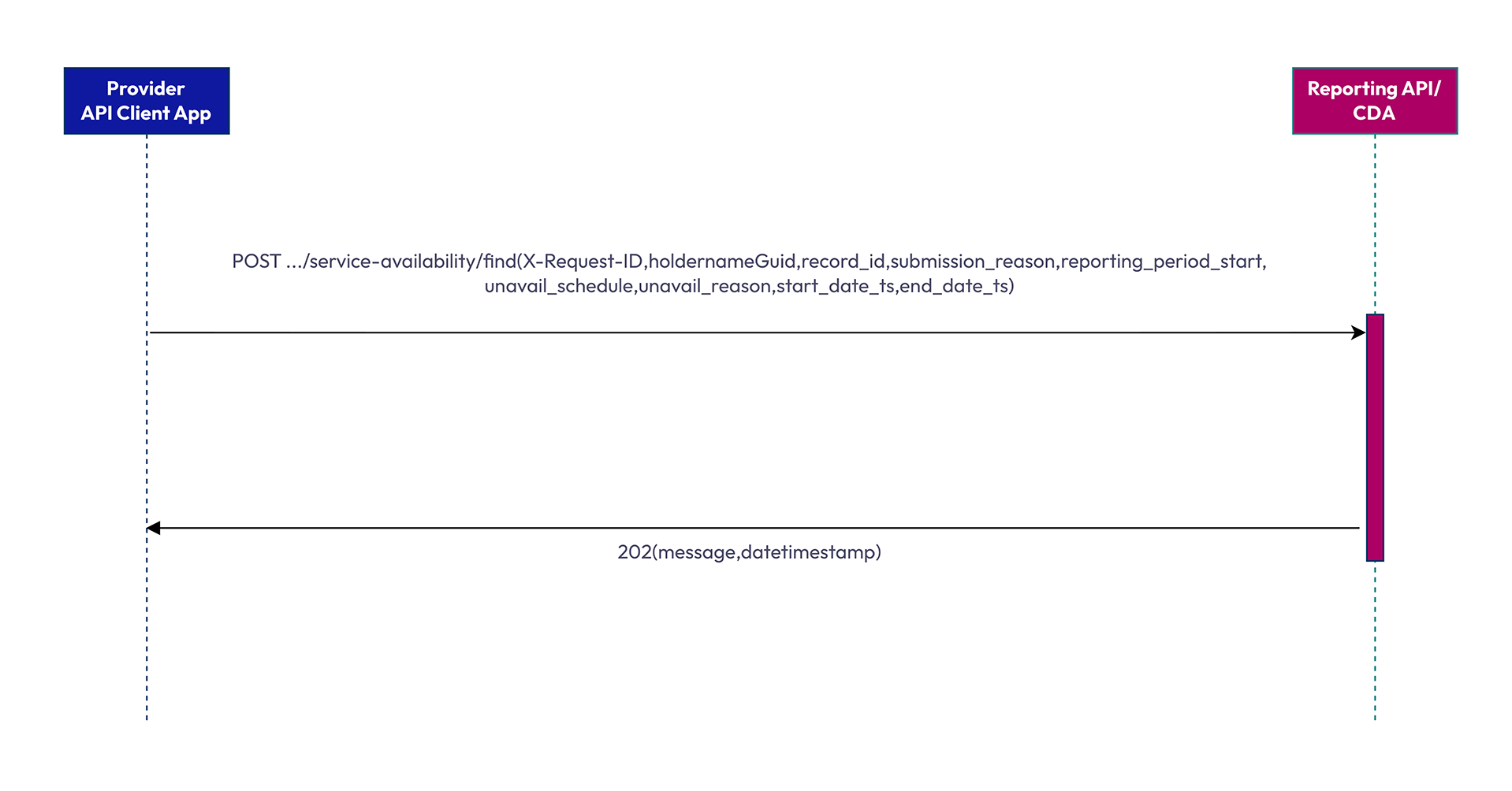
The ’Provider API Client App‘ submits a POST request to the .../service-availability/find endpoint containing X-Request-ID, holdernameGuid, record_id, submission_reason, reporting_period_start, unavail_schedule, unavail_reason, start_date_ts, and end_date_ts.
The Reporting API/CDA acknowledges receipt by returning an HTTP 202 response containing a message and datetimestamp.
service-availability/find (null submission)
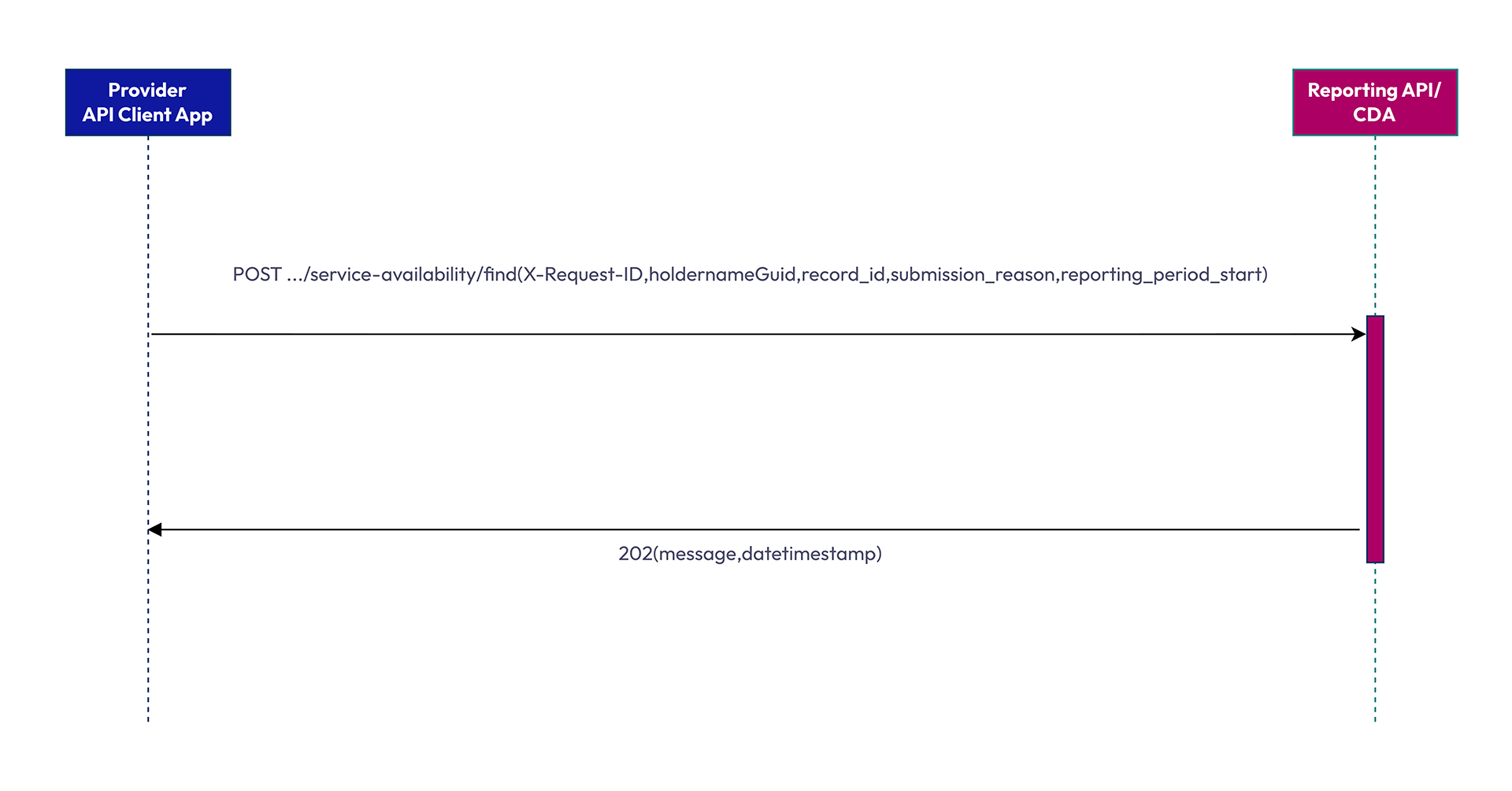
The 'Provider API Client App' submits a POST request to the .../service-availability/find endpoint containing X-Request-ID, holdernameGuid, record_id, submission_reason, and reporting_period_start.
The Reporting API/CDA acknowledges receipt by returning an HTTP 202 response containing a message and datetimestamp.
service-availability/view (single record – initial or resubmission)
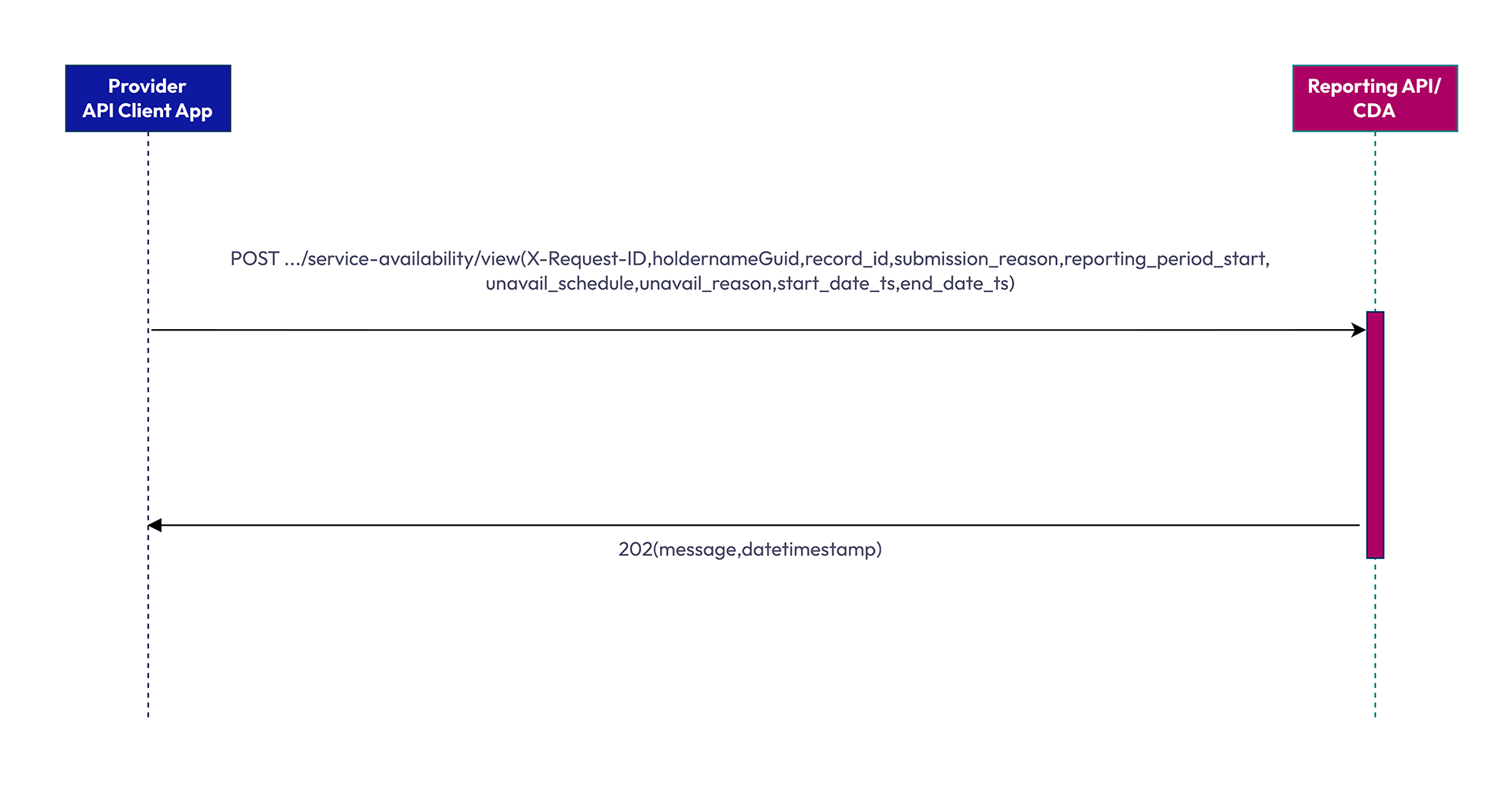
The 'Provider API Client App' submits a POST request to the .../service-availability/view endpoint containing X-Request-ID, holdernameGuid, record_id, submission_reason, reporting_period_start, unavail_schedule, unavail_reason, start_date_ts, and end_date_ts.
The Reporting API/CDA acknowledges receipt by returning an HTTP 202 response containing a message and datetimestamp.
service-availability/view (null submission)
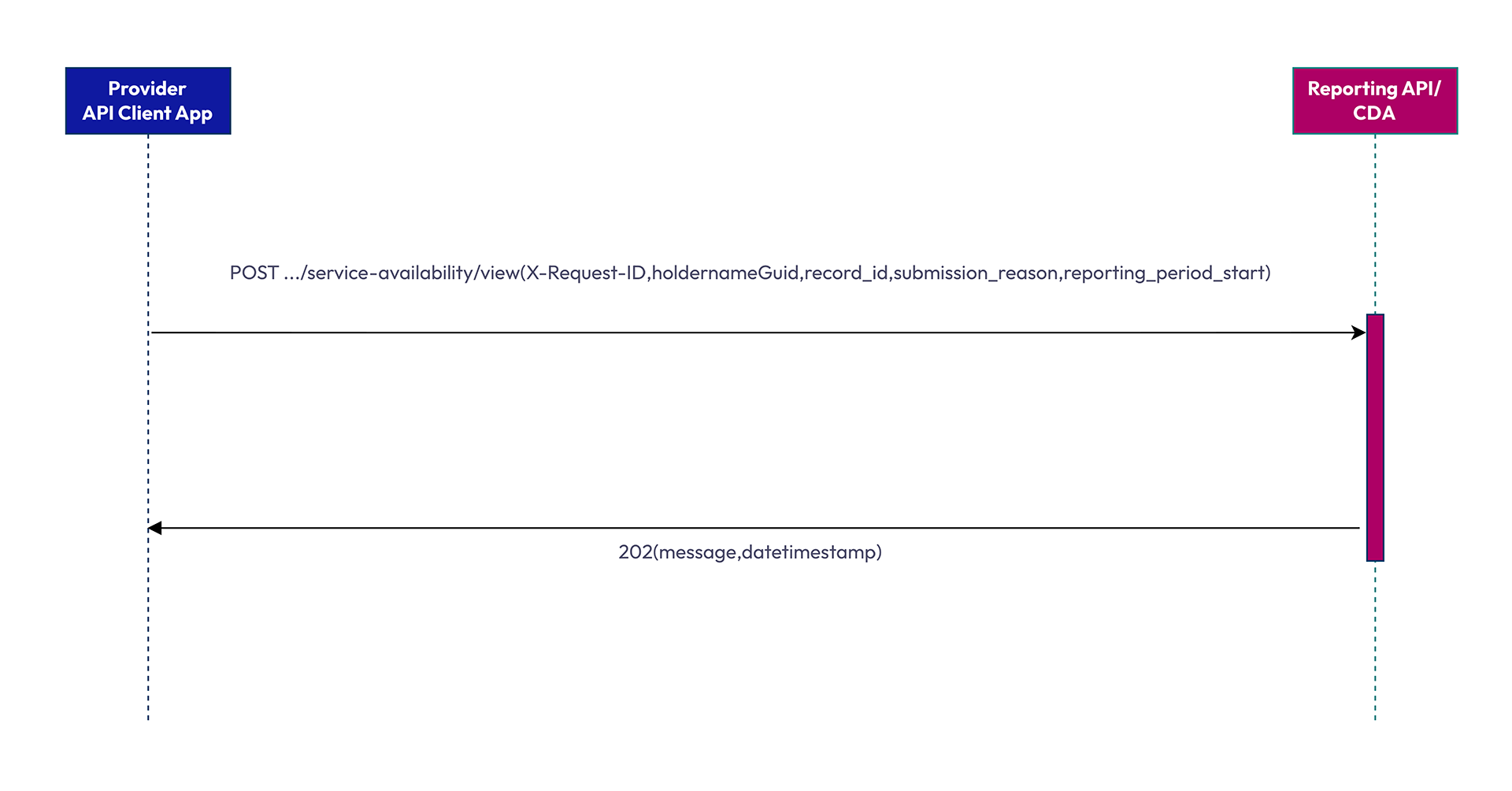
The 'Provider API Client App' submits a POST request to the .../service-availability/view endpoint containing X-Request-ID, holdernameGuid, record_id, submission_reason, and reporting_period_start.
The Reporting API/CDA acknowledges receipt by returning an HTTP 202 response containing a message and datetimestamp.
view-response/request-number (single record – initial or resubmission)
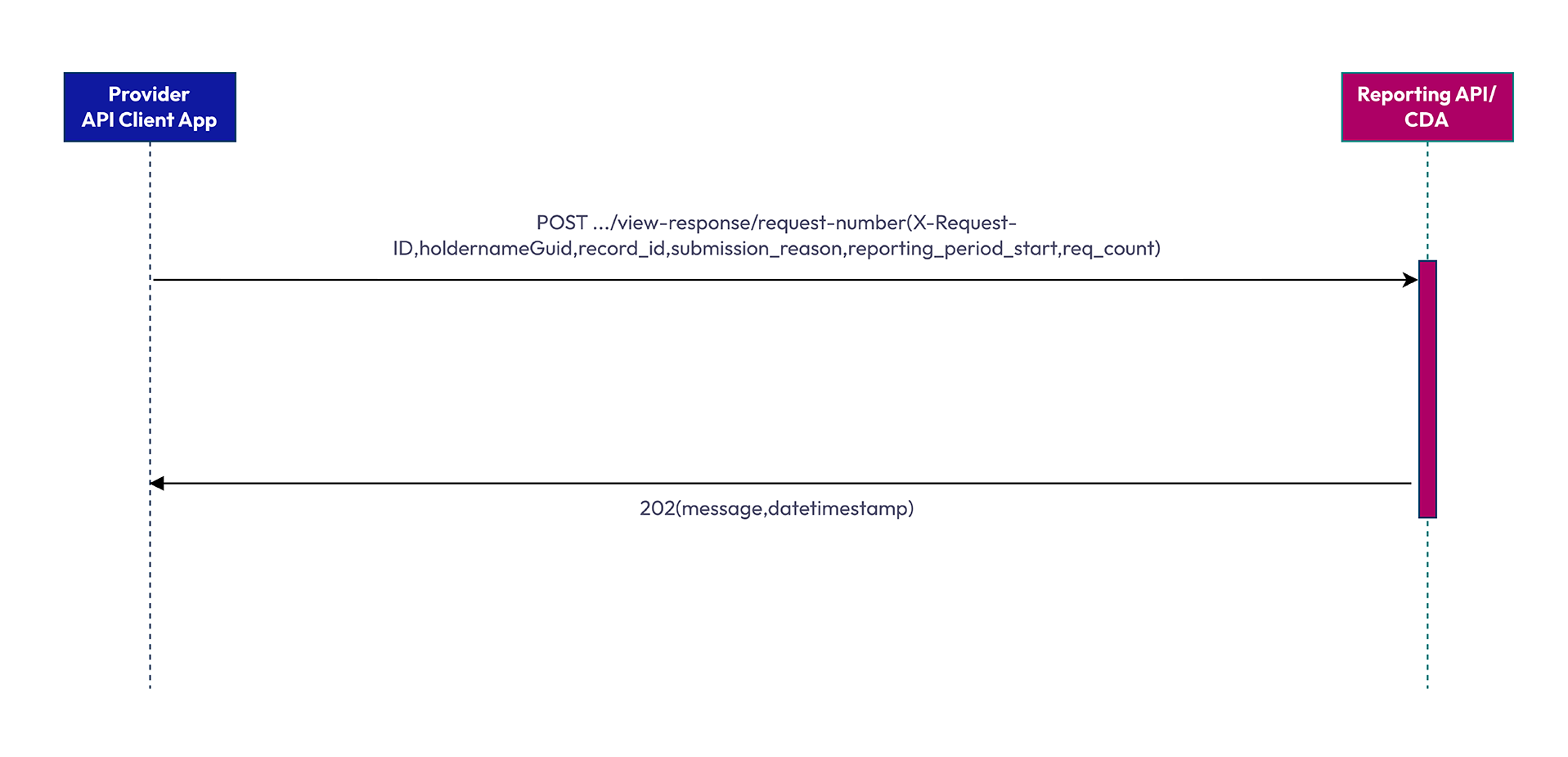
The 'Provider API Client App' submits a POST request to the .../view-response/request-number endpoint containing X-Request-ID, holdernameGuid, record_id, submission_reason, reporting_period_start, and req_count.
The Reporting API/CDA acknowledges receipt by returning an HTTP 202 response containing a message and datetimestamp.
view-response/response-time (single record – initial or resubmission)
view-response/response-time (null submission)
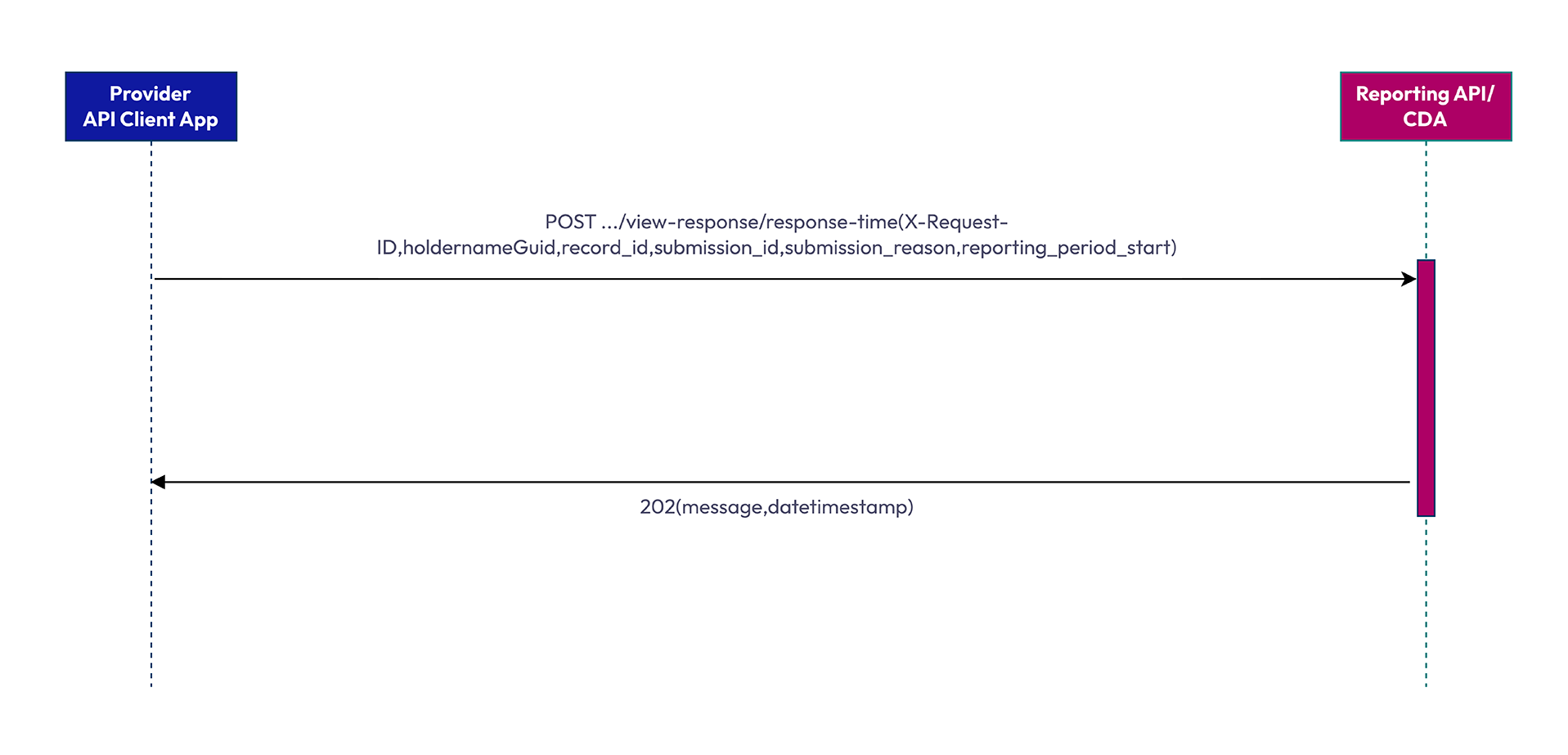
The 'Provider API Client App' submits a POST request to the .../view-response/response-time endpoint containing X-Request-ID, holdernameGuid, record_id, submission_id, submission_reason, and reporting_period_start.
The Reporting API/CDA acknowledges receipt by returning an HTTP 202 response containing a message and datetimestamp.
view-response/calculations (single calculations, batch submission – initial or resubmission)
view-response/calculations (null submission)
view-response/calculations (multiple calculations, batch submission – initial or resubmission)
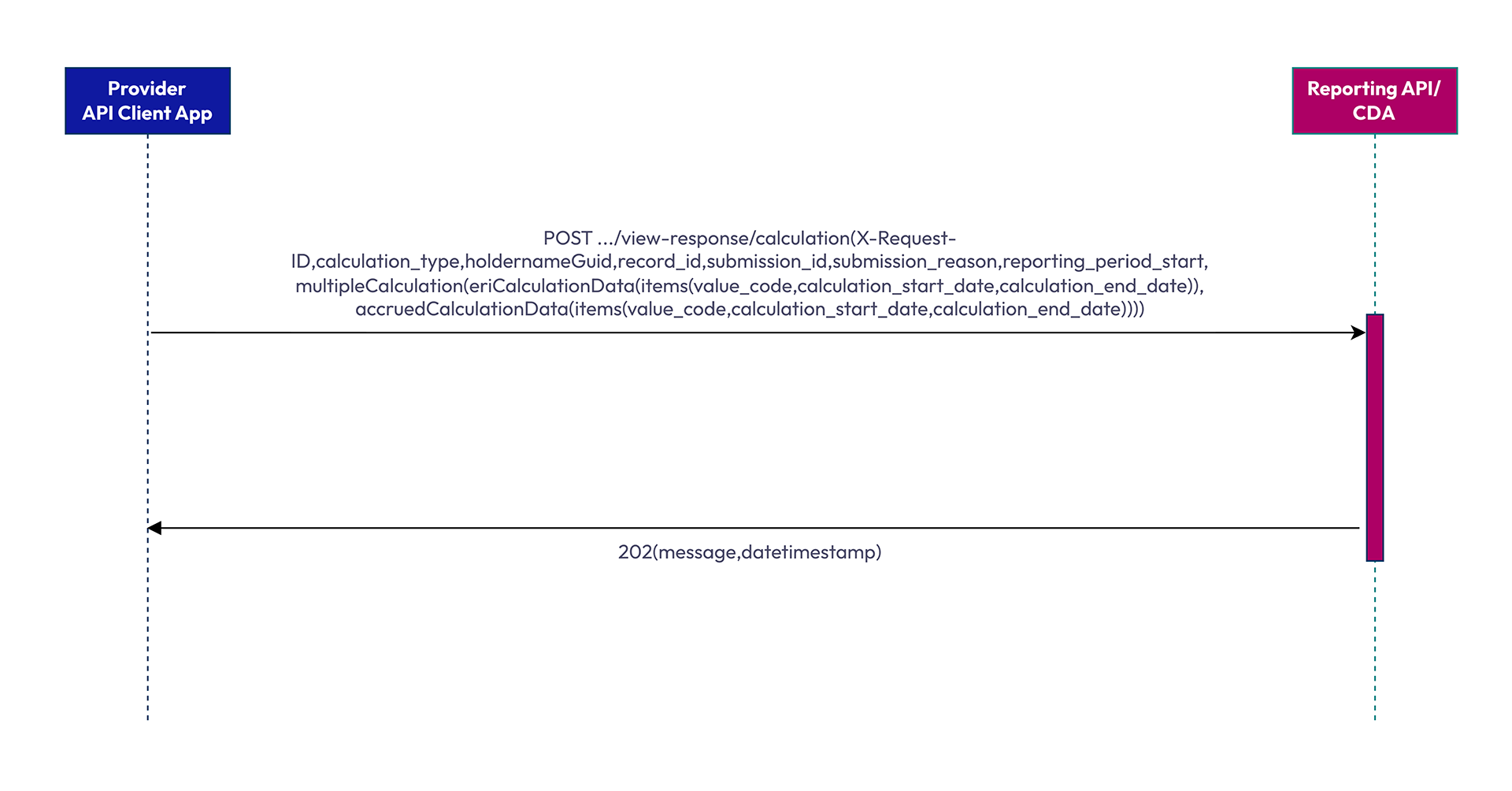
The 'Provider API Client App' submits a POST request to the .../view-response/calculation endpoint containing X-Request-ID, calculation_type, holdernameGuid, record_id, submission_id, submission_reason, reporting_period_start and multipleCalculation (comprising eriCalculationData and accruedCalculationData, each containing value_code, calculation_start_date, and calculation_end_date).
The Reporting API/CDA acknowledges receipt by returning an HTTP 202 response containing a message and datetimestamp.
view-response/unavailable (batch submission – initial or resubmission)
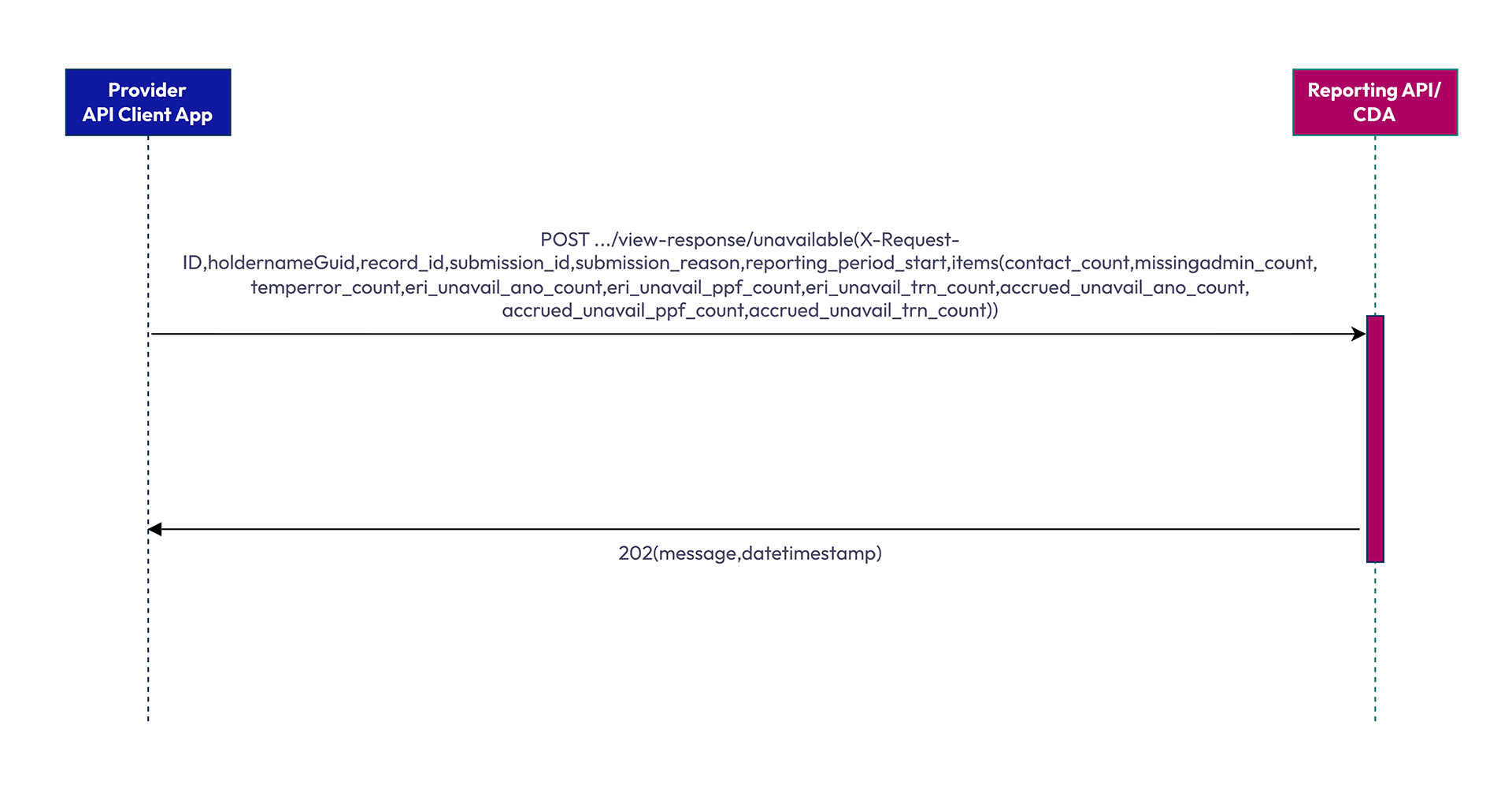
The 'Provider API Client App' submits a POST request to the .../view-response/unavailable endpoint containing X-Request-ID, holdernameGuid, record_id, submission_id, submission_reason, and reporting_period_start, and items containing contact_count, missingadmin_count, temperror_count, eri_unavail_ano_count, eri_unavail_ppf_count, eri_unavail_trn_count, accrued_unavail_ano_count, accrued_unavail_ppf_count, and accrued_unavail_trn_count.
The Reporting API/CDA acknowledges receipt by returning an HTTP 202 response containing a message and datetimestamp.
Annex 4: Payload examples
RS2.1 Initial submission (single record) for service-availability/find
| Name | Sent as | Datatype | Format | Example |
|---|---|---|---|---|
| X-Request-ID | Header | String | UUID/ GUID | “816f82b5-8e4f-407b-8c54-afb179c4af5a” |
| holdernameGuid | Request body | String | UUID/GUID | “6ac7f2a5-d518-44bf-9dff-ec5bf7e46e06” |
| record_id | Request body | String | UUID/GUID | “35cfcfb0-d98d-451f-83f1-e59933078555” |
| submission_reason | Request body | String | Enum | “initial submission” |
| submission_status | Request body | String | Enum | “on time” |
| submission_id | Request body | String | UUID/GUID | null |
| reporting_period_start | Request body | Date-time | YYYY-MM-DD THH:MM:SS.000Z | 2026-07-30T00:00:00.000Z |
| unavail_scheduled | Request body | Boolean | True/False | True |
| unavail_reason | Request body | String | Plain text | “Planned maintenance” |
| start_date_ts | Request body | Date-time | YYYY-MM-DD THH:MM:SS.000Z | 2026-07-30T05:30:24.245Z |
| end_date_ts | Request body | Date-time | YYYY-MM-DD THH:MM:SS.000Z | 2026-07-30T05:59:25.284Z |
RS2.2 Resubmission (single record) for service-availability/view
| Name | Sent as | Datatype | Format | Example |
|---|---|---|---|---|
| X-Request-ID | Header | String | UUID/ GUID | “416f82b5-8e4f-407b-8c54-afb179c4af5a” |
| holdernameGuid | Request body | String | UUID/GUID | “6ac7f2a5-d518-44bf-9dff-ec5bf7e46e06” |
| record_id | Request body | String | UUID/GUID | “35cfcfb0-d98d-451f-83f1-e59933078555” |
| submission_reason | Request body | String | Enum | “resubmission” |
| submission_status | Request body | String | Enum | “correction” |
| submission_id | Request body | String | UUID/GUID | null |
| reporting_period_start | Request body | Date-time | YYYY-MM-DD THH:MM:SS.000Z | 2026-12-01T00:00:00.000Z |
| unavail_scheduled | Request body | Boolean | True/False | True |
| unavail_reason | Request body | String | Plain text | “Planned maintenance” |
| start_date_ts | Request body | Date-time | YYYY-MM-DD THH:MM:SS.000Z | 2026-12-01T03:00:00.000Z |
| end_date_ts | Request body | Date-time | YYYY-MM-DD THH:MM:SS.000Z | 2026-12-01DT04:00:00.000Z |
RS2.2 Resubmission (batch) for service-availability/view
Record 1
| Name | Sent as | Datatype | Format | Example |
|---|---|---|---|---|
| X-Request-ID | Header | String | UUID/GUID | “216f82b5-8e4f-407b-8c54-afb179c4af5a” |
| holdernameGuid | Request body | String | UUID/GUID | “5bcdf2a5-d518-44bf-9dff-ec5bf7e46e06” |
| record_id | Request body | String | UUID/GUID | “56cfcfb0-d98d-451f-83f1-e59933078555” |
| submission_reason | Request body | String | Enum | “resubmission” |
| submission_status | Request body | String | Enum | “correction” |
| submission_id | Request body | String | UUID/GUID | “8bd7f2a5-d519-44bg-9dff-ec5bf7e46e06” |
| reporting_period_start | Request body | Date-time | YYYY-MM-DD THH:MM:SS.000Z | 2026-12-03T00:00:00.000Z |
| unavail_scheduled | Request body | Boolean | True/False | True |
| unavail_reason | Request body | String | Plain text | “Planned maintenance” |
| start_date_ts | Request body | Date-time | YYYY-MM-DD THH:MM:SS.000Z | 2026-12-03T00:30:00.000Z |
| end_date_ts | Request body | Date-time | YYYY-MM-DD THH:MM:SS.000Z | 2026-12-03T01:30:00.000Z |
Record 2
| Name | Sent as | Datatype | Format | Example |
|---|---|---|---|---|
| X-Request-ID | Header | String | UUID/ GUID | “816f82b5-8e4f-407b-8c54-afb179c4af5a” |
| holdernameGuid | Request body | String | UUID/GUID | “6ac7f2a5-d518-44bf-9dff-ec5bf7e46e06” |
| record_id | Request body | String | UUID/GUID | “35cfcfb0-d98d-451f-83f1-e59933078555” |
| submission_reason | Request body | String | Enum | “resubmission” |
| submission_status | Request body | String | Enum | “correction” |
| submission_id | Request body | String | UUID/GUID | “8bd7f2a5-d519-44bg-9dff-ec5bf7e46e06” |
| reporting_period_start | Request body | Date-time | YYYY-MM-DD THH:MM:SS.000Z | 2026-12-03T00:00:00.000Z |
| unavail_scheduled | Request body | Boolean | True/False | True |
| unavail_reason | Request body | String | Plain text | “Planned maintenance” |
| start_date_ts | Request body | Date-time | YYYY-MM-DD THH:MM:SS.000Z | 2026-12-03T03:30:00.000Z |
| end_date_ts | Request body | Date-time | YYYY-MM-DD THH:MM:SS.000Z | 2026-12-03T04:30:00.000Z |
RS3.1(a) Initial submission (single record) for view-response/request-number
| Name | Sent as | Datatype | Format | Example |
|---|---|---|---|---|
| X-Request-ID | Header | String | UUID/ GUID | “416f82b5-8e4f-407b-8c54-afb179c4af5a” |
| holdernameGuid | Request body | String | UUID/GUID | “6ac7f2a5-d518-44bf-9dff-ec5bf7e46e06” |
| record_id | Request body | String | UUID/GUID | “35cfcfb0-d98d-451f-83f1-e59933078555” |
| submission_reason | Request body | String | Enum | “resubmission” |
| submission_status | Request body | String | Enum | “correction” |
| submission_id | Request body | String | UUID/GUID | null |
| reporting_period_start | Request body | Date-time | YYYY-MM-DD THH:MM:SS.000Z | 2026-12-01T00:00:00.000Z |
| req_count | Request body | Integer | Number | 100 |
RS3.1(b) Initial submission (batch) for view-response/response-time
Record 1
| Name | Sent as | Datatype | Format | Example |
|---|---|---|---|---|
| X-Request-ID | Header | String | UUID/ GUID | “816f82b5-8e4f-407b-8c54-afb179c4af5a” |
| holdernameGuid | Request body | String | UUID/GUID | “5bcdf2a5-d518-44bf-9dff-ec5bf7e46e06” |
| record_id | Request body | String | UUID/GUID | “35cfcfb0-d98d-451f-83f1-e59933078555” |
| submission_reason | Request body | String | Enum | “initial submission” |
| submission_status | Request body | String | Enum | “on time” |
| submission_id | Request body | String | UUID/GUID | “8bd7f2a5-d519-44bg-9dff-ec5bf7e46e06” |
| reporting_period_start | Request body | Date-time | YYYY-MM-DD THH:MM:SS.000Z | 2026-11-05T:00:00.000Z |
| req_date_ts | Request body | Date-time | YYYY-MM-DD THH:MM:SS.000Z | 2026-11-05T13:00:00.000Z |
| resp_date_ts | Request body | Date-time | YYYY-MM-DD THH:MM:SS.000Z | 2026-11-05T13:00:11.000Z |
Record 2
| Name | Sent as | Datatype | Format | Example |
|---|---|---|---|---|
| X-Request-ID | Header | String | UUID/ GUID | “216f82b5-8e4f-407b-8c54-afb179c4af5a” |
| holdernameGuid | Request body | String | UUID/GUID | “6ac7f2a5-d518-44bf-9dff-ec5bf7e46e06” |
| record_id | Request body | String | UUID/GUID | “97cfcfb0-d98d-451f-83f1-e59933078555” |
| submission_reason | Request body | String | Enum | “initial submission” |
| submission_status | Request body | String | Enum | “on time” |
| submission_id | Request body | String | UUID/GUID | “8bd7f2a5-d519-44bg-9dff-ec5bf7e46e06” |
| reporting_period_start | Request body | Date-time | YYYY-MM-DD THH:MM:SS.000Z | 2026-11-05T00:00:00.000Z |
| req_date_ts | Request body | Date-time | YYYY-MM-DD THH:MM:SS.000Z | 2026-11-05T14:00:05.000Z |
| resp_date_ts | Request body | Date-time | YYYY-MM-DD THH:MM:SS.000Z | 2026-11-05T14:00:17.000Z |
RS3.1(b) null submission for view-response/response-time
| Name | Sent as | Datatype | Format | Example |
|---|---|---|---|---|
| X-Request-ID | Header | String | UUID/ GUID | “816f82b5-8e4f-407b-8c54-afb179c4af5a” |
| holdernameGuid | Request body | String | UUID/GUID | “6ac7f2a5-d518-44bf-9dff-ec5bf7e46e06” |
| record_id | Request body | String | UUID/GUID | “35cfcfb0-d98d-451f-83f1-e59933078555” |
| submission_reason | Request body | String | Enum | “null submission” |
| submission_status | Request body | String | Enum | “on time” |
| submission_id | Request body | String | UUID/GUID | null |
| reporting_period_start | Request body | Date-time | YYYY-MM-DD THH:MM:SS.000Z | 2026-11-05T00:00:00.000Z |
RS3.2 Initial or resubmission (batch) for view-response/calculations (single calculation)
Record 1
| Name | Sent as | Datatype | Format | Example |
|---|---|---|---|---|
| X-Request-ID | Header | String | UUID/ GUID | “816f82b5-8e4f-407b-8c54-afb179c4af5a” |
| holdernameGuid | Request body | String | UUID/GUID | “6ac7f2a5-d518-44bf-9dff-ec5bf7e46e06” |
| record_id | Request body | String | UUID/GUID | “35cfcfb0-d98d-451f-83f1-e59933078555” |
| submission_reason | Request body | String | Enum | “initial submission” |
| submission_status | Request body | String | Enum | “on time” |
| submission_id | Request body | String | UUID/GUID | “8bd7f2a5-d519-44bg-9dff-ec5bf7e46e06” |
| reporting_period_start | Request body | Date-time | YYYY-MM-DD THH:MM:SS.000Z | 2026-11-05T00:00:00.000Z |
| calculation_type | Request body | Enum | List | “single” |
| value_code | Request body | Enum | List | “DBC” |
| calculation_start_date | Request body | Date | YYYY-MM-DD | 2026-10-30 |
| calculation_end_date | Request body | Date | YYYY-MM-DD | 2026-11-05 |
Record 2
| Name | Sent as | Datatype | Format | Example |
|---|---|---|---|---|
| X-Request-ID | Header | String | UUID/ GUID | “816f82b5-8e4f-407b-8c54-afb179c4af5a” |
| holdernameGuid | Request body | String | UUID/GUID | “6ac7f2a5-d518-44bf-9dff-ec5bf7e46e06” |
| record_id | Request body | String | UUID/GUID | “35cfcfb0-d98d-451f-83f1-e5101923745626” |
| submission_reason | Request body | String | Enum | “initial submission” |
| submission_status | Request body | String | Enum | “on time” |
| submission_id | Request body | String | UUID/GUID | “8bd7f2a5-d519-44bg-9dff-ec5bf7e46e06” |
| reporting_period_start | Request body | Date-time | YYYY-MM-DD THH:MM:SS.000Z | 2026-11-05T00:00:00.000Z |
| calculation_type | Request body | Enum | List | “single” |
| value_code | Request body | Enum | List | “DBC” |
| calculation_start_date | Request body | Date | YYYY-MM-DD | 2026-10-30 |
| calculation_end_date | Request body | Date | YYYY-MM-DD | 2026-11-05 |
RS3.2 Initial or resubmission (batch) for view-response/calculations (multiple calculations)
Record 1
| Name | Sent as | Datatype | Format | Example |
|---|---|---|---|---|
| X-Request-ID | Header | String | UUID/ GUID | “816f82b5-8e4f-407b-8c54-afb179c4af5a” |
| holdernameGuid | Request body | String | UUID/GUID | “6ac7f2a5-d518-44bf-9dff-ec5bf7e46e06” |
| record_id | Request body | String | UUID/GUID | “35cfcfb0-d98d-451f-83f1-e59933078555” |
| submission_reason | Request body | String | Enum | “initial submission” |
| submission_status | Request body | String | Enum | “on time” |
| submission_id | Request body | String | UUID/GUID | “8bd7f2a5-d519-44bg-9dff-ec5bf7e46e06” |
| reporting_period_start | Request body | Date-time | YYYY-MM-DD THH:MM:SS.000Z | 2026-11-01T00:00:00.000Z |
| calculation_type | Request body | Enum | List | “multiple” |
| value_code | Request body | Enum | List | “DBC” |
| calculation_start_date | Request body | Date | YYYY-MM-DD | 2026-10-25 |
| calculation_end_date | Request body | Date | YYYY-MM-DD | 2026-11-01 |
Record 2
| Name | Sent as | Datatype | Format | Example |
|---|---|---|---|---|
| X-Request-ID | Header | String | UUID/ GUID | “816f82b5-8e4f-407b-8c54-afb179c4af5a” |
| holdernameGuid | Request body | String | UUID/GUID | “6ac7f2a5-d518-44bf-9dff-ec5bf7e46e06” |
| record_id | Request body | String | UUID/GUID | “35cfcfb0-d98d-451f-83f1-e5101923745626” |
| submission_reason | Request body | String | Enum | “initial submission” |
| submission_status | Request body | String | Enum | “on time” |
| submission_id | Request body | String | UUID/GUID | “8bd7f2a5-d519-44bg-9dff-ec5bf7e46e06” |
| reporting_period_start | Request body | Date-time | YYYY-MM-DD THH:MM:SS.000Z | 2026-11-01T00:00:00.000Z |
| calculation_type | Request body | Enum | List | “multiple” |
| value_code | Request body | Enum | List | “DBC” |
| calculation_start_date | Request body | Date | YYYY-MM-DD | 2026-10-25 |
| calculation_end_date | Request body | Date | YYYY-MM-DD | 2026-11-01 |
RS3.3 Initial or resubmission (single record) for view-response/unavailable
| Name | Sent as | Datatype | Format | Example |
|---|---|---|---|---|
| X-Request-ID | Header | String | UUID/ GUID | “816f82b5-8e4f-407b-8c54-afb179c4af5a” |
| holdernameGuid | Request body | String | UUID/GUID | “6ac7f2a5-d518-44bf-9dff-ec5bf7e46e06” |
| record_id | Request body | String | UUID/GUID | “35cfcfb0-d98d-451f-83f1-e5101923745626” |
| submission_reason | Request body | String | Enum | “initial submission” |
| submission_status | Request body | String | Enum | “on time” |
| submission_id | Request body | String | UUID/GUID | null |
| reporting_period_start | Request body | Date-time | YYYY-MM-DD THH:MM:SS.000Z | 2026-11-01T00:00:00.000Z |
| contact_count | Request body | Integer | Number | 0 |
| missingadmin_count | Request body | Integer | Number | 5 |
| temperror_count | Request body | Integer | Number | 0 |
| eri_unavail_ano_count | Request body | Integer | Number | 10 |
| eri_unavail_ppf_count | Request body | Integer | Number | 2 |
| eri_unavail_trn_count | Request body | Integer | Number | 2 |
| accrued_unavail_ano_count | Request body | Integer | Number | 10 |
| accrued_unavail_ppf_count | Request body | Integer | Number | 2 |
| accrued_unavail_trn_count | Request body | Integer | Number | 2 |
Changelog
Last updated:02/10/2026
Version 2.3
02/10/2026
Version 2.3
Download reporting standards version 2.3
This zip folder contains:
- Reporting standards v2.3.pdf
- PensionsDashboard-reporting-api-2_2.yaml
The standards document and related downloads are versioned independently, so their version numbers may not always align.
Version 2.3 of the reporting standards is in draft. The reporting standards version 2.0 were approved by the Secretary of State for Work and Pensions and the Department for Communities (Northern Ireland) in March 2025, making them legally binding. This version will continue to be legally binding for connected pension providers and schemes until a new version is formally approved.
Reporting standards v2.3
- Paragraph 45 (corrected on 22 October 2026): Clarification that the Note to RS3.1(b) specifying that only returns of view data tokens in response to authorised view requests applies only to (b).
- Paragraph 56 (corrected on 7 October 2026): Clarification that the API for RS3.2 is View Response calculations API, and that data must be provided in the format YYYY-MM-DDTHH:MM:SS.000Z, with the time component always set to 00:00:00.000Z (midnight UTC).
- Paragraph 66 (corrected on 22 October 2026): Clarification that where multiple records are to be replaced with a single record, the record_id in the correction single record should be the record_id of the first record within the initial erroneous batch submission.
- Annex 1: Clarification for calculation_start_date and calculation_end_date that time component is always set to 00:00:00.000Z (midnight UTC).
- Annex 2: Addition of 'INVALID_SUBMISSION_ID' and 'INVALID_SUBMISSION_STATUS' codes, aligning error codes with all of the mandatory data fields in Annex 1.
- Annex 3: Addition of written descriptions for sequence diagrams.
- Minor drafting changes throughout.
- Applied consistent use of the T separator for date-time formats (corrected on 22 October 2026).
Reporting API v2.2
- Updated the RS2.1/RS2.2 (Service Availability) example payloads to align with the schema definition, with each items array entry representing a single holder name and its associated availability data.
- Added 'BadRequestSubmissionIDExample' and 'BadRequestSubmissionStatusExample' error examples
Version 2.2
23/03/2026
Version 2.2
Download reporting standards version 2.2
This zip folder contains:
- Reporting standards v2.2.pdf
- reporting-api-v2.1.yaml
The standards document and related downloads are versioned independently, so their version numbers may not always align.
Reporting standards v2.2
- Pargraph 33, 42 and 47: Start and end times must be reported in UTC, not BST/GMT.
- Paragraph 51: Clarification on not reporting calculation times where a code changes.
- Paragraph 63: Clarification on max size limit - as per schema limits, which should ensure the 1MB limit is never reached.
- Paragraph 65: Clarification on submission_id.
- Paragraph 66: Clarify resubmission where 1 record replaces 2 or vice versa.
- Paragraph 68: Clarify submission reason for resubmission as null submission, and need to report initial, resubmissions, and null submissions separately when reporting unavailability for multiple holdernameGuids.
- Paragraph 75: Clarification on reporting multiple holdernames at same time for availability.
- Paragraph 76: Correction of definition of record_id.
- Annex 4: Correction of enum values to lower case, except value_code (DBC, DCC, which is capitalised).
Reporting API v2.1
Version 2.1
28/01/2026
Version 2.1
Download reporting standards version 2.1
This zip folder contains:
- Reporting standards v2.1.pdf
- reporting-api-2_0.yaml
The standards document and related downloads are versioned independently, so their version numbers may not always align.
Introduction and general changes
- Update to summary in introduction regarding implementation.
- Removal of ‘application’, since the standards all apply to pension providers and schemes.
- Separation of reporting standards into ad hoc reporting on request requirements (RS1.1) and daily reporting by API requirements (RS2.1, 2.2, 3.1, 3.2 & 3.3). No changes have been made to the data required to be collected and reported under RS1.1. All subsequent changes below apply to the requirements for daily reporting only.
- Addition of downloads section including OpenAPI specification: “Reporting_api_v2_0.yaml”
RS2.1 Find unavailability
- Addition of further definition and examples of when to record and report service unavailability.
- Clarification to start and end dates and times: where the clocks go forward/back, this could mean end time is reported as being before the start time.
- Any service interruption caused by PDP system unavailability would not be counted.
- Addition of requirement that where there has been no service unavailability for the reporting period, ‘null submission’ must be submitted to confirm the absence of relevant unavailability data to report.
RS2.2 View unavailability
- Addition of further definition and examples of when to record and report service unavailability.
- Clarification to start and end dates and times: where the clocks go forward/back, this could mean end time is reported as being before the start time.
- Addition of requirement that where there has been no service unavailability for the reporting period, ‘null submission’ must be submitted to confirm the absence of relevant unavailability data to report.
RS3.1 View request numbers and response times
- Clarification that CDA-side processing is not part of view response time calculation and therefore exclusion of any longer response time due solely to CDA errors from reporting of view responses exceeding 10 seconds.
- Addition to indicate actual times must be reported (if a view request and associated response straddle a change to BST/GMT, it is possible the start time could be after the end time, or that a response may appear to have taken over an hour).
- Addition of requirement where there have been no view responses exceeding 10 seconds within the reporting period to report ‘null submission’ to confirm the absence of relevant response time data to report for RS3.1(b).
RS3.2 Value data calculation times
- Clarification of ‘working day’ definition.
- Clarification that this only needs to be reported for standard cases where pension providers and schemes use the 3 or 10 working day calculation time as permitted by the legislation. This would be where there are no recent (from a statement in the last 13 months or calculation within the last 12 months) values available to return immediately. In these cases, the data standards 2.301/401 ERI/accrued unavailable codes ‘DCC’ and ‘DBC’ are used. In all other cases, where other unavailable codes are returned, calculation time need not be reported. Counts of specified other codes must be reported as per RS3.3, however.
- Addition of note that pension providers and schemes have duties under the legislation to calculate the values within the prescribed timeframe, irrespective of unavailable codes returned. Consequently, even though calculation times need not be reported under the reporting standards, pension providers and schemes will need to ensure they keep records to be able to demonstrate they have the appropriate processes in place to provide the value data required by the legislation to members in a timely manner.
- Addition of requirement to report calculation times per calculation where multiple values are being calculated separately and may therefore be completed and made available at different points in time. Where all values for a member’s benefits under the scheme are calculated and made available together at the same time, however, they may be reported as a single calculation time.
- Clarification that calculation time starting from a view request (as per CoCo2.1.7) is unaffected by any subsequent view requests.
- Addition of requirement where there have been no calculations that have completed within the reporting period to report ‘null submission’ to confirm the absence of relevant calculation time data to report.
RS3.3 Values unavailable
- Clarification that every use of a code specified within the reporting period must be reported, rather than a count of view responses containing the codes (a single view response could contain multiple codes).
Addition of general reporting standards for data submission
- Requirement added for UTF-8 encoding.
- Specification of reporting window added - between midnight and 06:00am the day after the events reported (when clocks change this adjusts to 05:00am/07:00am accordingly).
- Specification of maximum record size: 1mb. Where the reporting data to be submitted exceeds this maximum record size, the data must be submitted as multiple records sent as a batch, with a submission_id linking them together.
- Requirement added to use record_id for each record.
- Requirement added to use submission_id for batched records.
- Requirement added for resubmissions (where necessary to correct errors) to fully replace previous records.
- Requirement added for submission reason to be provided, identifying whether the submission is initial, resubmission, or null.
- Requirement added for submission status, indicating whether the submission is on time, late, or correction.
- Specification of reporting period start date.
- Addition of submission failure and retry rules.
- Addition of data catalogue in Annex 1, with data tables detailing required data fields for:
- All record submissions
- Reports for RS2.1 and 2.2
- Reports for RS3.1
- Reports for RS3.2
- Reports for RS3.3
- Addition of pseudo codes returned in CDA error responses in Annex 2.
- Addition of API sequence diagrams in Annex 3 covering:
- Initial submission
- Resubmission
- Late submission
- Null submission
- Addition of API payload examples in Annex 4