
How to connect
For pension providers, schemes, third-party administrators and integrated service providers connecting directly
How to prepare, the steps to take, and the resources available to support you. While this guidance can be accessed at any time, the engagement team will invite you to begin the journey.
Step-by-step connection journey and guidance
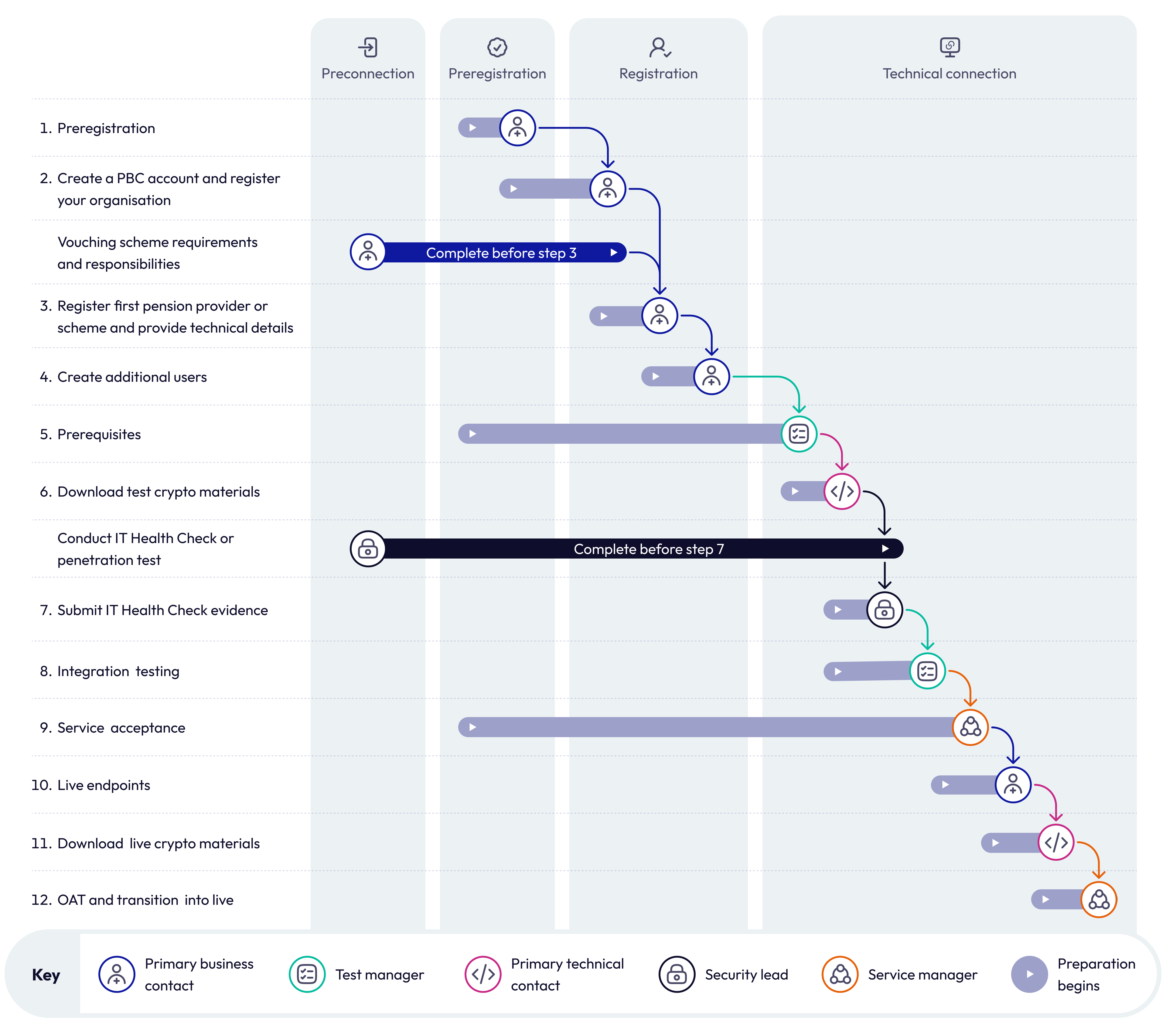
Step-by-step connection journey description
The diagram above outlines the steps you need to take in order to establish a technical connection. You must complete each step in order but you can begin preparation for some steps earlier – this is shown by the ‘preparation bars’ in the diagram.
The tasks outlined 'Vouching scheme requirements and responsibilities' and 'How to get a registration code for your vouching scheme' must be completed before starting registration.
You should begin preparing for 'Conduct IT Health Check or penetration test'.
- Step 1: Preregistration
You should begin preparing for 'Prerequisites' and 'Service acceptance'.
- Step 2: Create a PBC account and register your organisation
- Step 3: Register the first scheme and provide technical details (you must have completed 'Vouching scheme requirements and responsibilities' before starting this step)
- Step 4: Create additional users
You cannot complete the later steps until 'Prerequisites' is complete.
- Step 5: Prerequisites
- Step 6: Download test cryptographic materials
- Step 7: Submit IT Health Check evidence (you need to have sucessfully completed 'Conduct IT Health Check or penetration test' to complete this step)
- Step 8: Integration testing
- Step 9: Service acceptance
- Step 10: Provide live endpoints
- Step 11: Download live cryptographic material
- Step 12: Operational acceptance testing (OAT) and transition into live
Preconnection
Who's involved
- primary business contact (PBC)
- security lead
Read the full list of roles and responsibilities. We recommend you identify the people in your organisation who will be involved in each step as soon as possible.
What you need to do
You should be familiar with the the pensions dashboards standards and guidance which contain the rules and controls for connecting to the ecosystem.
Before you can apply to connect, you need to show that your organisation is technically robust and has a pension provider or scheme willing to vouch for you.
- Vouching scheme requirements and responsibilities
- How to get a registration code for your vouching scheme
- Begin preparation to conduct an IT Health Check or penetration test
Pension providers and schemes can then obtain a registration code from their regulator and, if using a third-party administrator or ISP to connect, provide it to them.
Next steps
You can move onto preregistration.
Preregistration
Who’s involved
- primary business contact
- primary technical contact
- technical teams
Read the full list of roles and responsibilities.
What you need to do
This is where you register interest in connecting to the dashboards ecosystem. You need to show that your organisation has a valid reason to connect to the ecosystem, prove your identity and show that you have the staff to perform the roles we need.
Next steps
Once you've completed this stage successfully, you can move onto registration.
Registration
Who’s involved
- primary business contact (PBC)
Read the full list of roles and responsibilities.
What you need to do
You now register your organisation and your first provider or scheme. Once you’ve created a PBC account for yourself, you need to create accounts for all your organisation’s users.
2. Create a PBC account and register your organisation
3. Register first pension provider or scheme and provide technical details
Next steps
Your user accounts will be verified within a day. Once this is completed, we will guide you through the process of technical connection.
Technical connection
Who’s involved
- primary business contact
- primary technical contact
- test manager
- security lead
- service lead
Read the full list of roles and responsibilities.
What you need to do
You should review the system and integration testing resources before you begin.
6. Download test cryptographic material (for more information, read the guidance on PKI and cryptographic materials)
7. Submit IT Health Check evidence
11. Download live cryptographic material
12a. Operational acceptance testing (OAT) and transition into live
12b. Reporting standards production monitoring
Next steps
After successfully connecting to the ecosystem, you can manage your connection and add pension providers and schemes.
Add pension providers and schemes
If you are an integrated service provider or third-party administrator, you can add pension providers and schemes.
Change connection plans
If a pension provider or scheme is planning to connect more than 30 days before or after their ‘connect by’ date in guidance, you can notify PDP and the relevant regulator of a change in connection plans.
Manage connection
- Pension provider or scheme data management
- Account and organisation data management
- Manage cryptographic materials
- Technical change
- Transfer of pension providers or schemes: Ceding provider
- Transfer of pension providers or schemes: Acquiring provider
- Submit new IT Health Check (ITHC) or penetration test
- Planned and unplanned downtime
User account management
Manage user accounts in the connection portal.

Support
Find answers to common queries about pensions dashboards, give feedback or get technical support.